








Annotation Droplets
January 30th, 2009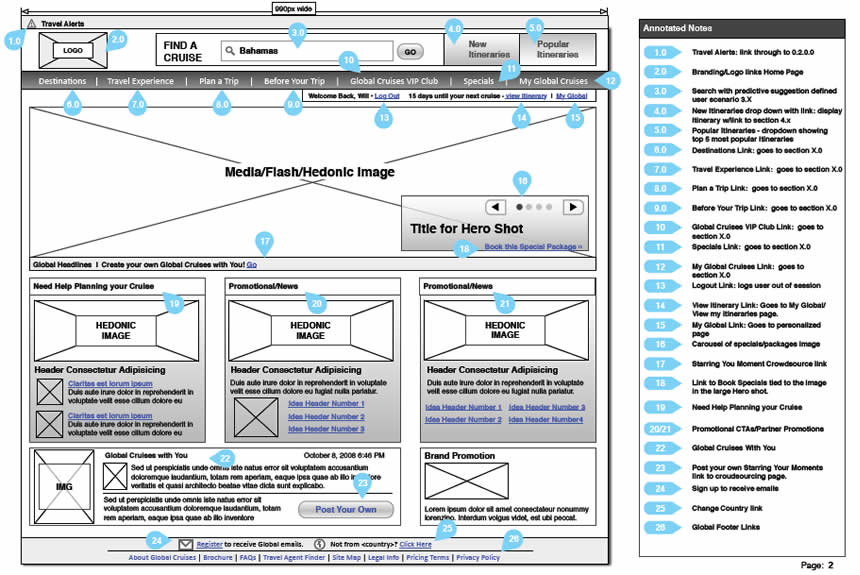
This little design documentation pattern has been with us for a long time and yet it’s still worthy of mentioning. The idea of annotating wireframes using droplets or circles with one pointy edge is a nice visual technique. The coloured circle is what grabs the attention quite well, combined with the pointed edge that allows to reference a very specific area. Will Evans allowed me to post this sample and he also has an interesting write up on his wireframing process. Finally there is also a Konigi Omnigraffle Stencil which uses these droplets as well. I’d also be very much interested to see what others are doing in terms of annotation. If you have interesting visuals, please send those samples over! :)
Credits: Will Evans
13 Responses to “Annotation Droplets”













January 30th, 2009 at 10:07 am
Very nice annotation to the wireframe! I usually use the 'sticky note' symbol in Axure (as seen http://www.whatwasithinking.co.uk/2008/04/12/on-info...target=”_blank”>here or the notes box in iRise.
January 30th, 2009 at 10:19 am
Sorry, link was: http://www.whatwasithinking.co.uk/2008/04/12/on-informat...target=”_blank”>http://www.whatwasithinking.co.uk/2008/04/12/on-i…
January 30th, 2009 at 6:26 am
Hi Alex. This bad link must be an IntenseDebate bug. I let them know about this, and hopefully they can fix this.
January 30th, 2009 at 1:44 pm
I find these a great tool in Visio. I grabbed Garrett Dimon's templates and they have a great annotaion shape [ http://v1.garrettdimon.com/resources/templates-st…].
January 30th, 2009 at 2:23 pm
http://www.greenonions.com“target=”_blank”>Dan Brown showed Visio users how to create their own on http://www.boxesandarrows.com/view/wireframe_annotatio...target=”_blank”>Boxes and Arrows.
January 30th, 2009 at 2:24 pm
Uggh…sorry…comments not accepting markup. Dan Brown (http://www.greenonions.com)showed Boxes and Arrows readers how to create their own using Visio: http://www.boxesandarrows.com/view/wireframe_annotations...
February 1st, 2009 at 6:42 am
That's a great tip! But I think if you don't care about these annotations you can compromise the understand of your wireframes.
I'm learning a lot with this Mag. Thanks a lot guys!
February 3rd, 2009 at 4:29 pm
Garrett's annotation shape is built off of Dan's article.
February 11th, 2009 at 4:54 am
Testing. Please ignore.
February 16th, 2009 at 4:55 am
I trialled the droplet style on a couple of projects and found it a bit fiddly – in the end I just used single text objects and set the background colour to contrast with the wireframe and used a round-cornered fat stroke which matched the background – it looks like a circle object with a text object positioned/grouped, but much easier to handle.
In a recent project I went even more minimal, using a solid dot with a line connecting to the relevant note. The dot was a good 2 or 3 times thicker than the wireframe lines, so they stood out without drawing a lot of attention. The advantage to using this method is I don't need to worry about skipping/doubling up on note numbers as I remove/add annotations.
I'll scrub the client details and submit soon.
June 12th, 2009 at 2:16 pm
I have seen this done in many different ways.
I am edging to prefer annotated prototype in real HTML/CSS with overlayed annotations which are based on JavaScript.
September 2nd, 2010 at 4:53 am
I have seen this done in many different ways.