




Interactive Sketching Notation 0.1

October 29th, 2009
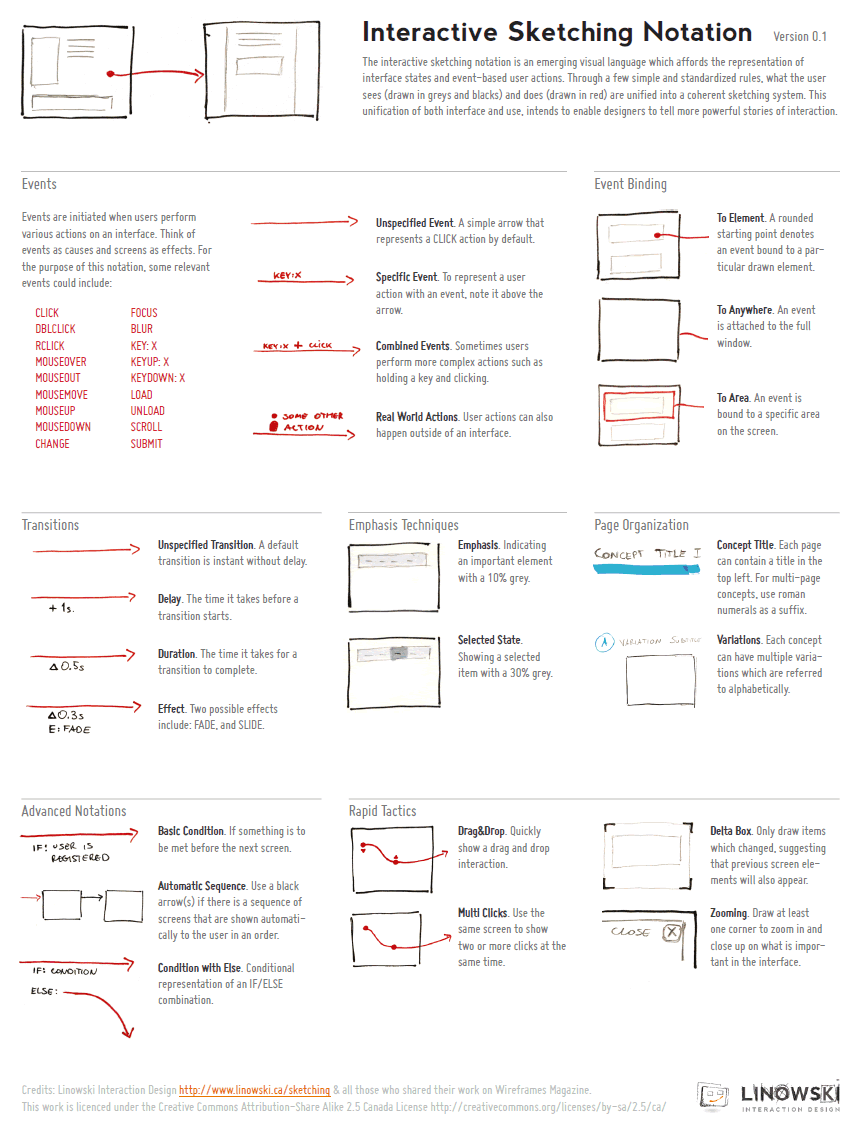

After being inspired by people’s UI sketches for almost a year now, only naturally, my own approach to drawn user interactions with pen and paper began emerging. This personal compilation of the various techniques which I find relevant, is being published as the so called Interactive Sketching Notation. The general idea behind this notation is the desire to visualize user interface states as well as user actions in a clear and rapid manner. This of course, as the version number implies, is an emerging visual language for sketching interactions which I hope to continue to evolve and improve well into the future. Thanks again to all those who made this possible and please let me know if you find it helpful or have any recommendations. If this inspires your own approach to sketching, I would also love to see some samples of how people use this. .

Download the PDF directly.

Credits: Jakub Linowski

  • del.icio.us
  • Twitter
  • Tumblr
  • Facebook
  • Digg
  • email
  • Mixx
  • Google Bookmarks
  • StumbleUpon

This website uses IntenseDebate comments, but they are not currently loaded because either your browser doesn't support JavaScript, or they didn't load fast enough.

32 Responses to “Interactive Sketching Notation 0.1”
  1. Lucks Says:

    I like the interaction, I think I will put in practice for the next projects, and hope that others persons do the same.

  2. Matt Yankelovich Says:

    I think it's pretty cool from the perspective of understanding one's own sketch interactions. My only concern is that some may want to show this to a client, and expect the client to understand the interactions that are trying to be conveyed through the notation; but of course, you might not want to be showing clients sketches anyway :)

    Very cool! Thanks

  3. josh Says:

    This is excellent. Thanks for sharing!

  4. Zaq Says:

    Is the red a pen, pencil, marker? Just curious

  5. Jakub Linowski Says:

    Hey Zaq. The red is a thin sharpie pen.

  6. ryw Says:

    Can you post a sample set of drawings using this notation? Would love to see it in context.

  7. Liou Says:

    Just a pedant suggestion. How about using the abbreviation FX instead of E for effects? It's quite common and probably more understandable.

    I think that you might be better off switching to prototype when you get very complex diagrams. Do you make use of prototypes yourself?

  8. Experience Planning on the Web: Week 1 Says:

    [...] http://wireframes.linowski.ca/2009/10/interactive-sketching-notation-v0-1/ [...]

  9. Jakub Linowski Says:

    Liou. I like the FX suggestion. Thanks!

  10. Jason Robb Says:

    This is awesome. I need to make one of these for myself. Leah Buley has a great sketching pattern library as well: http://www.flickr.com/photos/jasonrobb/4064453154...

  11. Interact Seattle » Blog Archive » User eXperience (UX) Digest Says:

    [...] Interactive Sketching Notation 0.1 [...]

  12. pauric Says:

    i made an omnigraffle stencil of the above notation: http://www.graffletopia.com/stencils/518/

  13. Jakub Linowski's Interactive Sketching Notation — purecaffeine.com » ux Says:

    [...] User and Social Experience DesignAn under-development notation system for user interaction interaction design documentation.I stumbled across Wireframes Magazine today – a blog dedicated to collecting and sharing user interface design and information architecture wireframe production techniques, tools and examples – and found Jakub Linowski’s Interactive Sketching Notation. [...]

  14. Links | carmel hassan (ui designer) Says:

    [...] Interactive Sketching Notation 0.1 [...]

  15. FLUXD - Roll Over Beethoven – Mouse Interaction, Hit Areas and the importance of good Timing Says:

    [...] Annotating wireframes with animation data can do the trick for less complex projects. Though that approach can soon become messy and complicated and less than self explanatory. The best way to assure you get this right is by building interactive prototypes. A topic I intend to write more about in the future as I progress with my experiments and work. [...]

  16. Feedback: Text tool is causing stress (and other notes) – SimpleDiagrams Says:

    [...] Implement some more features that help diagram UX flows (starting with Jakob Linowski’s sketching notation ) [...]

  17. tSherrell Says:

    Thanks for making the Omnigraffle version!

  18. tSherrell Says:

    Jakub,

    These look great. It would be great to have a common IA/UX/UI language.

  19. charlene Says:

    Funny (as in funny interesting), this reminds me of animation storyboards and x-sheets where similar types of notation is used to indicate actions the camera is making or timing for specific actions.

  20. 50 Free UI and Web Design Wireframing Kits, Resources and Source Files « PacmanRetro Says:

    [...] Interactive Sketch NotationThe general idea behind this notation is the desire to visualize user interface states as well as user actions in a clear and rapid manner. [...]

  21. links for 2010-02-05 « PacmanRetro Says:

    [...] Wireframes Magazine Wireframes Magazine is an on-line resource about design documentation samples for information architects, interaction designers and user experience professionals. (tags: ping.fm) [...]

  22. 50 Free UI and Web Design Wireframing Kits, Resources and Source Files « Top 10 Web Hosting Says:

    [...] Interactive Sketch Notation The general idea behind this notation is the desire to visualize user interface states as well as user actions in a clear and rapid manner. [...]

  23. 50 Free UI and Web Design Wireframing Kits, Resources and Source Files » PTW New Says:

    [...] Interactive Sketch Notation The general idea behind this notation is the desire to visualize user interface states as well as user actions in a clear and rapid manner. [...]

  24. 50 Free UI and Web Design Wireframing Kits, Resources and Source Files | In Nicobru mind Says:

    [...] Interactive Sketch Notation The general idea behind this notation is the desire to visualize user interface states as well as user actions in a clear and rapid manner. [...]

  25. 50 Free UI and Web Design Wireframing Kits, Resources and Source Files :: Reflex Stock Photo Blog Says:

    [...] Interactive Sketch NotationThe general idea behind this notation is the desire to visualize user interface states as well as user actions in a clear and rapid manner. [...]

  26. Roman Bercot Says:

    Very cool! I like this a lot.

    Question: Shouldn't the notations on your interactions be in read also (since you've set black and grey as elements the user sees)?

  27. 50 Free UI and Web Design Wireframing Kits, Resources and Source Files | Web Design Cool Says:

    [...] Interactive Sketch NotationThe general idea behind this notation is the desire to visualize user interface states as well as user actions in a clear and rapid manner. [...]

  28. Jakub Linowski Says:

    Hey Roman,

    Perhaps. I'd say the ones related to user actions should be in red, and the ones pertaining to the interface should be in black. Of course it's all debatable. Which specific part were you referring to?

    Jakub

  29. 50 Free UI and Web Design Wireframing Kits, Resources and Source Files « Social-Press Says:

    [...] Interactive Sketch Notation The general idea behind this notation is the desire to visualize user interface states as well as user actions in a clear and rapid manner. [...]

  30. Jakub Linowski Says:

    Here is a drawing which resulted from using this notation: http://wireframes.linowski.ca/2010/02/tablet-illu...

  31. 50 Free UI and Web Design Wireframing Kits, Resources and Source Files | Variedades e Bookmarks Says:

    [...] Interactive Sketch NotationThe general idea behind this notation is the desire to visualize user interface states as well as user actions in a clear and rapid manner. [...]

  32. 50 Free UI and Web Design Wireframing Kits, Resources and Source Files | Elitecreations Says:

    [...] Interactive Sketch Notation The general idea behind this notation is the desire to visualize user interface states as well as user actions in a clear and rapid manner. [...]

Leave a Reply










