Posts Tagged ‘opensource’

The Animationizer

Friday, March 5th, 2010


Some time ago, Chris Neale showed off an awesome video of his stop motion animation prototypes. More recently, he has now published a software tool he built in Processing to create such videos. The tool is quite simple and basically allows users to capture screens with a webcam and export them to a folder. The Animationizer also supports a playback feature at 12 frames per second. Chris’ approach is to playback the animations and re-record them with a separate tool such as Screenflow or Silverback. (I also found CamStudio as an open source alternative). The tool is free of charge and comes with a Creative Commons Share Alike license. Thanks Chris! In his own words:

The Animationizer makes stop-frame animations quickly and easily using a webcam. I put it together to help make early prototypes for user experience design projects I’ve been working on. It might also be useful for art projects or science experiments – or maybe just to keep the kids occupied on a rainy afternoon.

For installation, basically you need to install Processing first and then download the code from his website. For those users on Windows, you might also need the WinVDIG for QT driver.

Pencil 1.1

Friday, January 29th, 2010


Recently a new version of the Pencil Project has come out which brings forth a set of new features. For those who don’t know the Pencil is an open source and community driven, UI design tool which originated as a Firefox extension (best extension of 2008). This new version however has stepped out of the browser and people can install this as a stand alone application. Other new features include the ability to interlink pages, export to various file formats, as well the creation of a Personal Collection (a library of sorts).

Another pretty cool feature is the Clipart Browser. The Pencil allows you to search the open directory over at clipart.org and insert SVG graphics straight into your mockup. Love it. :) Other than that, one minor area which could use some improvement is the handling of a group of items or reusing them across screens. Quite often UI tools either come with some sort of grouping or master functionality which seems to be missing here.

Give it a spin right here.

Wireframes 0.0.1 (A simple wireframe tool)

Saturday, January 16th, 2010


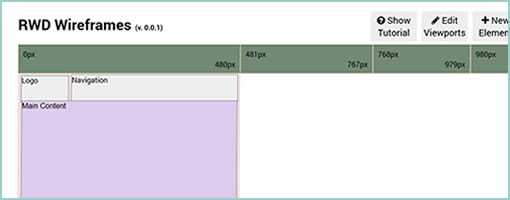
Batiste Bieler has just recently released an wireframing tool with both the python source and a demo available publicly. The tool, as its tagline implies, is quite simple and looks like it is just the beginning of a project. For now, users can start of by creating a wireframe by first specifying a grid on which to work on. Further, components can be inserted into the page from a pull down menu. I believe that in the next release Batiste will be opening up an administrative panel to allow users to create new components. Of course all components are dragable, resizable and editable. Excited to see some grassroots projects happening.

Check out the demo.

Credits: Batiste Bieler

Clickframes

Tuesday, January 12th, 2010


Clickframes is an open source software requirements tool which takes an XML notation as a source and generates a clickable document. First the requirements are written in the form of an appspec, are then fed into an interpreting tool (such as the hosted CLIPr), which in turn generates interactive documentation. Now don’t get me wrong, the generated documentation looks nothing like traditional wireframes. Clickframes are requirement abstractions which do not contain any structural information about various UI elements’ position or size (typical wireframe meat). Clickframes do however indicate the input elements which reside on each page as well as the paths of actions and the resulting outcomes that users can take. I find this interesting as this tool takes a stronger stand on the element of time as represented through such interactions. Hence, this tool visualizes cause and effect of user interactions explicitly, as opposed to having to be discovered.

Another definite Clickframe analogy which comes to mind is that of an interactive and auto-generated page description diagram. What both page description diagrams and clickframes in my opinion lack is the concreteness of elements in a given space which have been traded off for abstraction. For this, I assume there would be designers who start of projects by sketching and designers who begin by writing requirements. Perhaps Clickframes also resonate with what Ryan Singer of 37signals was speaking of when he mentioned that before the pen is laid to paper, a UI model should exist.

Credits: Jonathan Abbett & William Crawford of Beacon16

Plumb

Thursday, January 7th, 2010


Plumb is an open source tool (GitHub source) for drawing out placeholders on top of the Blueprint framework. You can simply draw out the boxes and it will automatically create the HTML for you. So what’s in it for me you ask? I noticed in the past that there is a community of HTML prototypers out there who like to do their interactive wireframes with grid systems in their most native form. With that, I thought this tool might be interesting to some. Enjoy.

Oh, and if you haven’t noticed already, I have a thing for open source software. Hence a separate opensource tag just appeared in the right navigation bar to separate out these types of projects. Cheers!

Credits: Michael Daines

Protokit 0.1

Thursday, December 17th, 2009


Protokit is an emerging experiment of Michael (konigi.com) targeted at those who like creating HTML prototypes. Protokit is a toolkit composed of existing Javascript libraries which work are combined to together to make the process easier. Hats off to open source prototyping. :) Also be sure to have a look at the working online demo. The toolkit is best described in his own words:

Protokit is a toolkit for creating HTML prototypes. It uses the following open source libraries and plugins: Blueprint, jQuery, jQuery UI, jQuery Templates, and iXEdit. More information about the included libraries and their licensing agreements can be found in the README file.

Credits: Michael Angeles

XMind

Thursday, September 3rd, 2009


In the light of the previous post about creating Functional Mindmaps, XMind is another open source tool to help with just that. The software is available for Mac, Windows and Linux, and allows to brainstorm ideas in a social way. Mind maps can be generated to explore abstract requirements or ideas. After a mind map is created, the document can be shared online free of charge. XMind also comes in a Pro version which allows to share your work privately. Pretty cool.

Download it here.

Infomaki 0.1 Goes Open Source

Wednesday, May 13th, 2009


Infomaki is a tool for gathering early user feedback based on displaying individual screens and asking simple questions. Typically, the questions look something like “where would if click if…” with the mouse clicks being recorded and eventually summed up and displayed as heat maps. Infomaki has been developed by the people over at NYPL Labs, and just a few days ago finally went open source (requires Ruby on Rails 2.2+). One interesting thing about this software is how flexible it is to the participants in terms of the duration of the evaluation. Since each screen shown is basically a independent evaluation of its own, it makes it possible for users to choose how long they wish to participate – being able to stop at any time. Thumbs up for going open source! :)

Download it from here.

Credits: Michael Lascarides – NYPL