As the flat design trend has been recently surfacing in popularity it made enemies with a few good old friends of mine, some of which include: shadows, gradients, and textures. Taken literally, under the flimsy banner of honesty, flat design has ventured out against interfaces which resemble anything three dimensional or portray depth on a two dimensional screen. I’m calling bullshit on this for a number of reasons.
Please Don’t Steal My Design Elements
Back to basics from the time when I was still a graphic design student, I remember there were some fundamental design elements given to us to make use of. Armed with such primal elements as color, line and shape, we were one step closer on the road to respecting human perception above following ephemeral styles. We were learning how people see so that we could setup good visual hierarchies and differentiate between the more important and less important things on a page or screen. By not making everything look equal, but instead by making things larger or smaller, closer or farther, we could begin to guide the eye while grabbing people’s attention in different degrees.
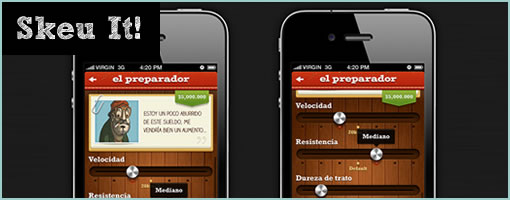
Come today, two of these elements that are being attacked by flat design are texture and space (or depth). If this new awesome trend is now taking them away, then it’s ripping pages out of my graphic design text book and actually making me poorer as a designer. Not cool. As visual communicators we are stronger with more tools and techniques at our disposal, not less. I therefore respect the fact that human beings can see depth and there is nothing wrong with making a primary call to action large, shiny, and three dimensional. I am placing my bets that an embossed depth loaded button will be noticed more often than some ideologically restricted flat blob. From a business stand point, my clients will also be happier with a stronger conversion rate and a better ROI. From a usability standpoint, people will sweat less while trying to determine what is clickable and what is not (Bokardo seems to agree).
How Memorable is Flat?
One last other undesirable side effect of flat design (and any other minimalist, modernist, reductionist, clean or simple styles which have come and gone) is its potential to undermine human memory. Some time ago, in the context of charts and bar graphs, we were taught that chart junk is bad and we should keep our data-ink ratios in check while not succumbing to evil décor. But is this so? We have been warned that a purely simple and clean approach comes at the cost of making it harder to recall the information later on. Let this be a warning that extreme simplicity might not be the silver bullet after all if we’re striving for higher memory recall rates.
The fundamental thing about flat design is that it is a restrictive trend that ought to be questioned. Perhaps it’s cheaper to develop, design or maintain, but if taken in its literal interpretation it could result in a lower quality user interface. I believe that being respectful of people’s perception, attention, memory and the human ability to register depth, wins at the end of the day over following any stylistic fad. The answer probably lies within a more balanced approach and therefore – I choose not to design with one of my hands tied behind my back.
Credits: Jakub Linowski (@jlinowski)
Since more and more bullshit has been surfacing to the top lately, I’ve created a new bullshit tag to keep track of it. :)