Posts Tagged ‘wireframe’

WireMolecules

Wednesday, May 19th, 2010


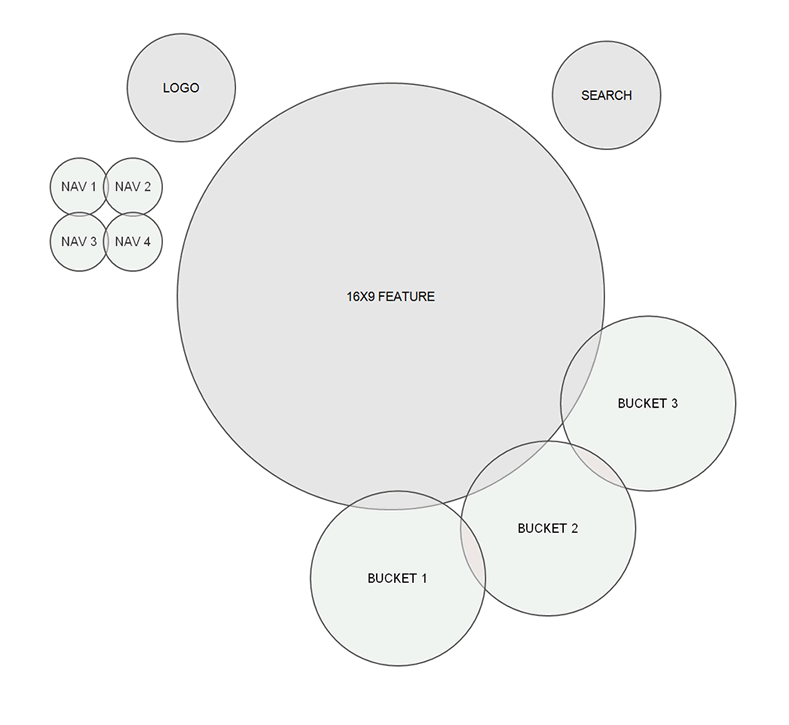
Here is an interesting example of a highly abstracted wireframe, labelled as a WireMolecule. Both the position and size of the represented elements within this example no longer represent what the interface will really look like. Instead, the focus has been shifted to showing relationships between elements as denoted by their proximity to each other. The size I also believe represents the importance of each element and not the actual size either (as also seen here and here). Definitely something a little different from a traditional wireframe. Andreas writes:

Traditional wire frames are misleading as they look too much like finished designs. Clients and designers alike run the risk of taking their direction too literally. And yet, despite all this, wire frames are invaluable tools in the start of any website design project.

And defines a WireMolecule as:

A chart giving an overview of relationships between components and features of a website. Wire molecules are developed during the Website Discovery phase and they provide instructions to designers, developers, and clients for how pages will look and behave.

Credits: Andreas Holmer

Google Drawings Wireframing Kit

Tuesday, April 27th, 2010


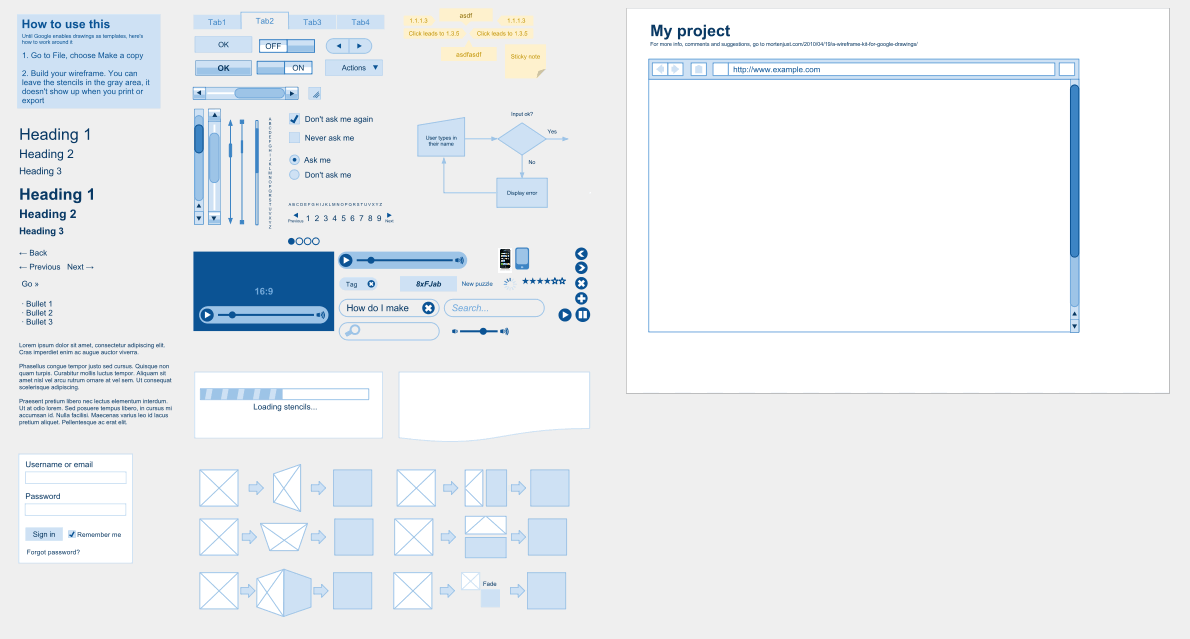
Morten created a stencil for the Google Drawings addition to Google Docs. Could be interesting to try. Comparing Google Docs as a wireframing tool to Omnigraffle and Visio, his five outlined advantages include:

  1. It’s live. The entire team can work on the same document and see each other’s work instantly
  2. The wireframes live in the cloud, no sending files around, no outdated documents
  3. The risk of losing data is zero. It saves for every edit you make
  4. It’s free
  5. Most people already have a Google account, so no sign up required

Credits: Morten Just

Big Transparent Thumbs

Tuesday, January 26th, 2010


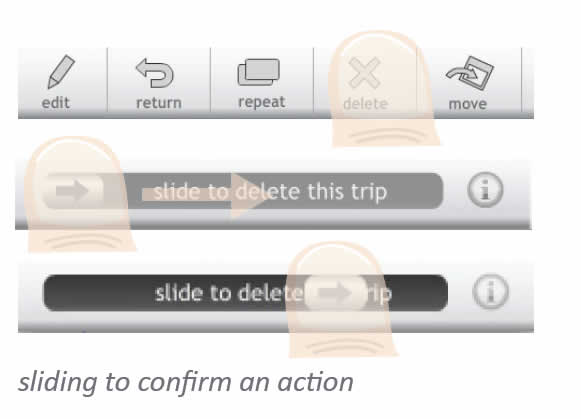
Vincent, a friend of mine, has been tinkering with some new ways of portraying simple touch screen interactions on his Get Around application. He uses a big overlaid thumb with a set transparency to indicate the touch. For indicating a dragging action, the thumb also contains an arrow with a direction. Just thought to share this as I found it interesting. To refresh quickly, Elaine has also approached the same problem previously in a slightly different way.

Credits: Vincent Steurs

OmniGraffle Wireflows

Tuesday, December 29th, 2009


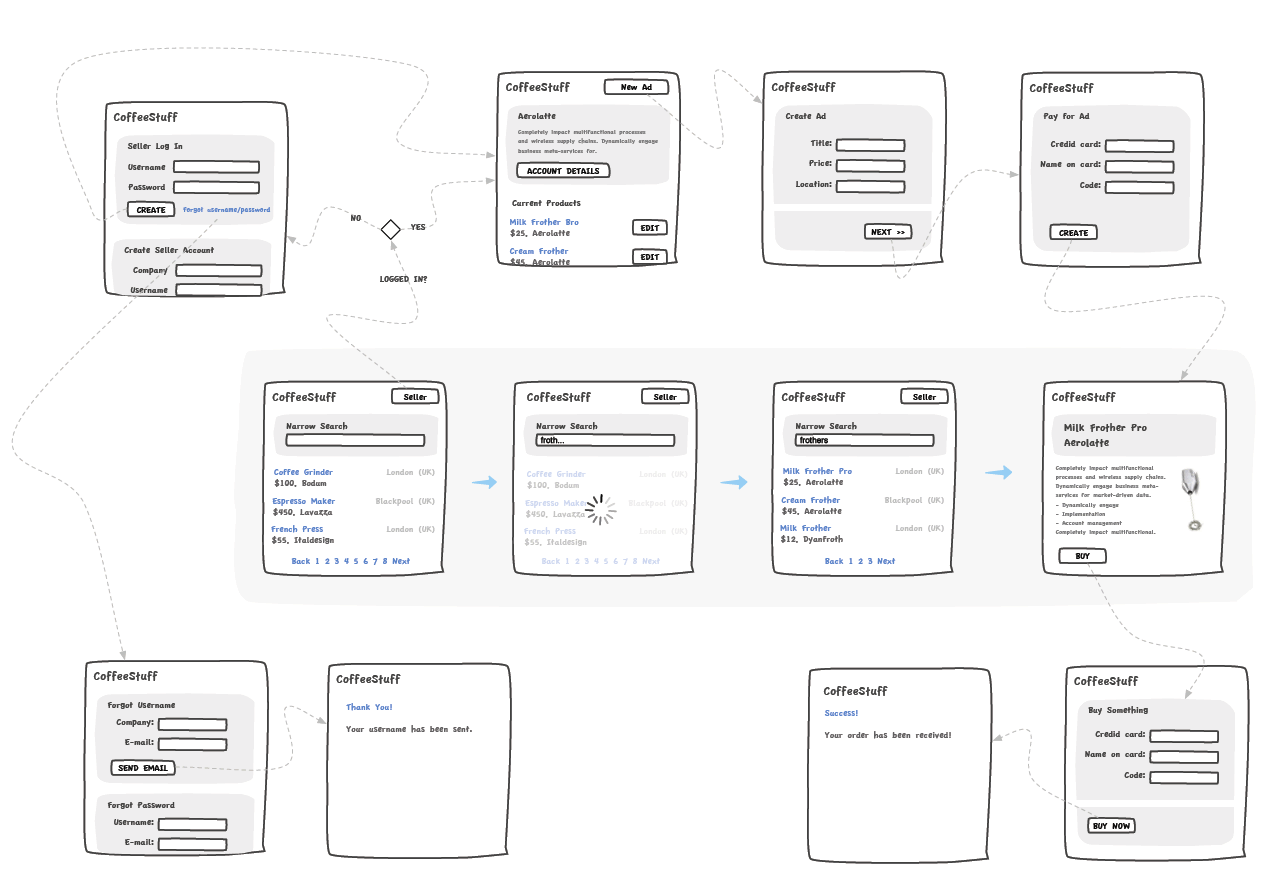
Andreas just sent in a sample of a wireflow done in Omnigraffle (here are a few more) which I thought was an interesting show. It contains a sketchy style, conditionals, and groups a set of pages together with a grey background area. Most recently, this way of working is also my personal preferred approach to communicating UI concepts. Not only does a deliverable like this convey activity more clearly, but it also provides a sense of scope in one snapshot. One problem with these wireflows which I’ve seen in the past is when the design proceeds further and more detail is required. Often in this situation I fall back and develop wireframes. This however duplicates the documentation which is undesirable from a maintenance perspective. Come to think of it, perhaps there is a way to reference occasional detailed wires, on demand, from within a wireflow diagram. Anyhow, here is what Andreas has to say:

I’ve got a combination wireframe/sitemap that I thought I’d share with you. Adequately called a WireMap. It’s a tool I started using in an attempt to get an overview of small to mid-sized web projects. (The limit is self-imposed. I like printing my work on paper and hanging it around the office. And there’s only so much information you can fit on Tabloid or A3).

Using the wiremap has been a boon both in talking to the internal team as well as taking to clients. In either case it helps the audience grasp the scope and complexity of the project. I’ve found it very helpful in the formative stage, but I see no reason why it couldn’t also be used later on in the development cycle as well.

My approach to this is the combination of wireframe sketching (for which I use Konigi’s Sketch stencil for OmniGraffle) in combination with J.J.Garrett’s IA templates (another OmniGraffle stencil). The result is very much a WireMap in that sense of the word—a site-wide visualization with some page detail (enough to provide an idea of the page’s purpose) as well as some rudimentary logic.

I’ve attached an example showing a WireMap of a mock website called CoffeeStuff. I’ve tried to keep it simple but could easily elaborate more if you think it worthwhile. Didn’t want to overwhelm the reader, but I’m keen to hear your thoughts as well. The map is by no means bulletproof, but I think it does a good job of introducing the general concept.

Credits: Andreas Holmer

Clickpaths

Tuesday, October 20th, 2009


Here is an idea for representing narrative or user actions inside a wireframe. As an alternative to flows I wanted to showcase what the user is doing right in the context of the interface. For this, a simple clickable hand symbol was used with a wireframe reference inside of it. This was meant as to suggest that a click causes a new wireframe to appear. The value of such an approach to flows, can be that the readers of this documentation do not have to flip through pages to refer to flows to understand what the user is doing. Flows can be said to diverge away from the concreteness of a wireframe into abstraction. Here, instead, the flow of user activity is coming closer in on the interface.

Credits: Jakub Linowski

Wiremaps

Thursday, October 15th, 2009


Combine wireframes and sitemaps together and you get something like this following sample from Jason. Wiremaps or siteframes? :) In the man’s own words:

First, the colors aren’t so significant. I just ran out of yellow. :) Underneath each sticky is a few other stickies from previous revisions. As time went on, things changed and so did the stickies on this page.

This document started off as ideas scribbled on a whiteboard. We devised an info architecture that involved controlling the user path by allowing them to drill down (vertically on the sheet) and across ( horizontally) but not diagonally. It’s not super clear, but everyone who needs to know understands the user flow through these pages.

There are 12 new pages that need to be created, as well as revising another half dozen or so. These sticky-frames also act as a site map, or at the least, a site map of templates.

Credits: Jason Robb

Long Page Sketches

Thursday, September 10th, 2009


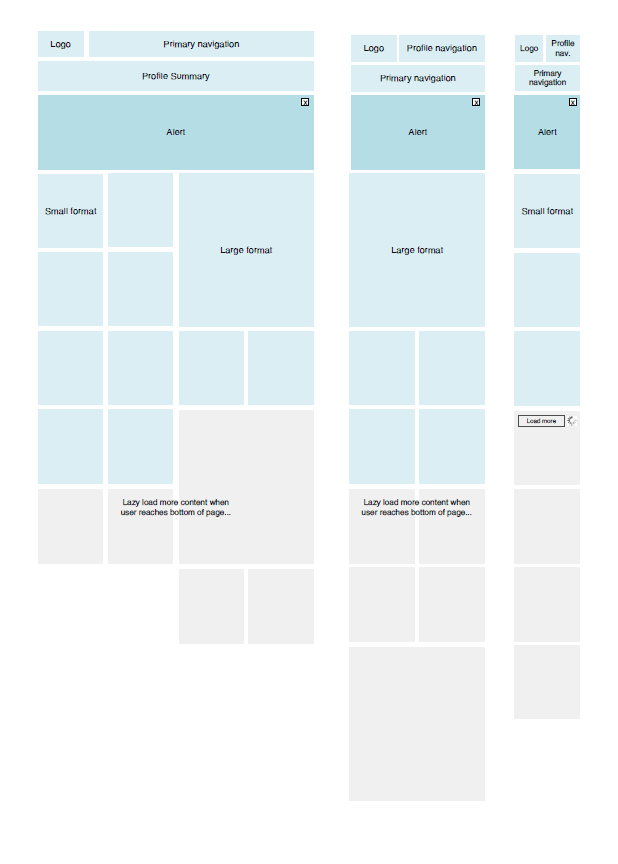
Quite often user interface pages will have to be long and scroll. As obvious as it sounds, here is a sketch which supports this. Jason has simply decreased the size of his frames and made them taller. On the same note, one of his sketches also makes use of a zigzagged line. I would guess that has been done to suggest a continuation of sorts, allowing him to communicate that there is more to the page without having to go into detail. I also like the heavy emphasis used on the title. Nice!

Credits: Jason Robb

State Annotations

Tuesday, August 18th, 2009


Here is a cool idea by Benoît which combines annotations with interface visuals into one coherent whole. Typically annotation bubbles were reserved for textual information, yet this sample extends it to contain more elaborate visual elements. More so, some of these annotations visible here also contain multiple variations of an interface suggesting some sort of multiple state representation.

Credits: Benoît Meunier

Mixed Scale Wireflow

Thursday, August 13th, 2009


Scott’s sample shares resemblance to the previously shared wireflows posts here and here. One thing it does a bit differently however is that it combines interfaces representation which differ in size or scale. Larger screens are mixed with smaller ones. More so, this example here also represents both interface screens (or what the users see), as well as user activity (or what the user does).

Credits: Scott Dudley

Pwireframing

Thursday, July 30th, 2009


Paper Wireframing is an article by Doug on his process work with an approach which relies very much on paper and scissors. A technique like this has been noted in the past to be engaging and collaborative. Perhaps what sets this method apart from the previous example, is the use of electronically generated content whose copies are then printed numerously for the generative session.

Doug writes:

The idea behind Pwireframing (again, wireframing with paper) was to make the regular wireframing process more modular and collaborative. Instead of having a designer simply follow the instructions of a strategist, we started by discussing all possible contents of pages as a group, including syndicated feeds Bethel is currently maintaining. We also made some decisions about feeds or content Bethel would be likely to bring online in the near future. After this, I drew and printed modular drawings of all of the types of content we talked about, and cut them into sets.

Read the full article.

Credits: Doug Gapinski