Archive for the ‘Tools’ Category

ProtoShare 6

Friday, January 13th, 2012


ProtoShare has recently gone live with the next version of their online prototyping app. The latest version of the tool takes design conversation to the next level by introducing topics. For one, topics are conversation placeholders which can be pinned to a page. More importantly however, topics can also be subscribed / unsubscribed from by various team members. This now allows collaborators some degree of filtering in terms of what might be relevant to them. Finally, another important characteristic of discussions is the way they elevate two types of conversation properties: decisions and resolutions. A comment inside a topic can now be marked as a decision, which makes it stand out visually as a task item to be acted on. Finally, a topic can come to a state of completion by being tagged as “resolved”. Taken together, this wave of improvements now allows for more structured design discussions.

ProtoShare 6 also brings a few extra improvements. These guys have now enabled drag and drop file uploading for a more seamless web-desktop experience. The layout has also been moved forward by increasing the size of the workspace and turning palettes into floating and movable ones. In other words, some minor usability improvements.

The last thing which really caught my attention was the ability to create and switch between multiple concepts (“Designs”) for a single page. In other words, the tool allows users to duplicate a page, try a different layout or idea, and then with time decide which one should be the proper one by means of “Activating” one. Strongly believing in multi-concept generation and the exploration of alternatives, I think this is a solid move from a design process standpoint.

>> Have a look yourself.

myBalsamiq

Monday, December 5th, 2011


myBalsamiq has just launched last month and took the web based version of Balsamiq Mockups and extended it with a bunch of collaboration features. The sketchy wireframes can now be uploaded online and organized into projects which can then also be given one of the following four access settings: private, website, blog and wiki. The default setting, “private”, is the most restricted and makes projects only visible to the specified members you share your work with. Whereas “wiki” on the other end of the spectrum is the most open and allows anonymous users to comment on, and edit the work. This degree of collaboration offers quite the flexibility for a variety of projects.

More so, myBalsamiq also comes with the ability to version your work by means of a revision history, as well as allows for email based discussion groups for each project. The web version of balsamiq resembles the desktop version so closely that it’s hard to tell the difference. Overall, I think this move marks a natural direction for the already awesome and popular tool.

Have a look.

InVision Prototyping Tool

Friday, November 11th, 2011


Here comes InVision, a simple click-through prototype building app. The tool itself is pretty light (in a good way) in that you do not design the actual pages in InVision. Instead, the idea is to design your screens in your other weapons of choice (Fireworks, Illustrator, Balsamiq, Photoshop etc.) and then upload them into InVision. Once you upload your GIFs, PNGs, or JPGs, the tool then allows you to create hotspots and link pages together. When creating these hotspots, you also are provided with a very useful ability to save them into templates for easier reusability.

InVision also comes with a few standard collaboration features. You can easily share a full prototype or individual pages through easily accessible links, which then can be commented on by the viewers. You can also invite additional designers if you need multiple people to work on the prototype.

One thing which becomes immediately apparent when using this is that a good amount of effort has also been put into designing the sleek interface. All the little tiny details in terms of interactions and visual design have been fine tuned. As an example, the upload process is quite smooth as files are drag and dropped from your desktop to the web app. Overall, a simple yet clearly focused little application!

Give it a try.

JustProto 2.0 + 3 Giveaways

Friday, October 28th, 2011


JustProto has made some improvements over the last little while as they moved on to version 2.0 of their web based prototyping app. This time around they included a bunch of collaboration features. This means that the tool now allows multiple designers to work on one prototype simultaneously in real time. More so, designers can also create a quick preview links of the prototype that can be shared with the team. What’s interesting and unique though is that the shared prototype also updates instantaneously as users continue to work on it – potentially handy for quick feedback. Furthermore, real time chat as well as comments in the form of tags, sticky notes and pins have also been included.

Additionally, the latest version also now includes a prepackaged range of useful famfam icons as well as an extended set of elements. Another improvement is that now users can create their own custom reusable components – a pretty standard and useful feature.

Along with their new site redesign, the team has also exposed a number of public prototypes examples to give people a better sense of what is possible with their software.

The Giveaway. Yup, you heard it. These guys are giving away 3 One Year Plus Licenses. What do you need to do? Sign up for an account and leave a comment here on this blog of what you think is useful or would do to improve the tool. The JustProto team is eager to hear out some feedback. Myself along with the JustProto team will try to select the three commentators within 7 days.

Update Congrats to Ben, Michael, and Antonio! They have been selected for the giveaway. :)

Proto.io – Mobile App Prototyping

Thursday, October 13th, 2011


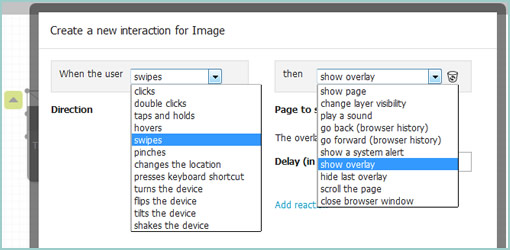
Proto.io is a new UI prototyping tool specifically tailored for mobile and tablet applications. The web based environment allows you to start off by creating a project for either the iPad or the iPhone. After creating a few screens, you typically would expect to be able to link a few pages together with interactivity – and proto.io does just that. It comes prepackaged with actions that are custom to hand held devices. So for example, you can simulate such interactivty as: clicks, taps, tap and holds, as well as swipes. Additionally, transitions such as slides, pops, fades and flips are also supported to make the prototype resemble the real experience more closely. Pretty cool.

Proto.io also comes with other more standard prototyping features. Users can create reusable templates and components into which a bunch of prepackaged and editable elements can be dragged onto. Just to give you a taste, have a look at the Picker Component demo which is fully customizable. Another interesting draggable component includes the HTML Code box that allows users to write custom HTML. The tool also has a useful snappy grid as well as some align to features for those who wish to work at a pixel perfect level. Once the prototype is ready you can of course publish and preview your prototype which works inside a browser as well as real devices.

The team is apparently also working on supporting Android devices in the near future. Rock on. :)

Try it out.

Credits: Alexis Piperides

Sketchify

Tuesday, June 7th, 2011


Sketchify is an open source toolkit for simulating simple drawings with a wide range of inputs in real time. As an example, it allows you to quickly create a functional prototype of a moving car along with the mouse acting as a controller for its direction. Other inputs which Sketchify may apparently hook up to include: motion sensing (with a webcam), speech recognition, face recognition, Wii Remote, web services, Phidgets, and Arduino. All of these of cource can then be tied back to move, hide, and affect various interface elements. Here are a couple additional youtube videos which demonstrate more examples of what is possible with this tool.

From the Sketchify website, in Željko’s own words:

Sketchify (also known as AMICO Sketchpad) is a toolset for sketching of novel classes of user interfaces, originally developed by Željko Obrenović at the Concept Lab of the Eindhoven Technical University. Sketchify extends the concept of paper and pencil sketching to a more generic concept of rapid manipulation of interaction material. Interactive material is any piece of software/hardware that represents or simulates a part of user interactive experiences, such as inputs from sensors, output of audio tools, interaction with Web services, or simple drawings. Through manipulation of interactive materials, designers create “interactive sketches”, which in rough terms illustrate interaction scenario or interaction techniques. Our tool gives a designer freedom to combine elements of traditional freehand sketching and with numerous extensions, such as end-user programming (spreadsheets and scripts), and links to existing software functionality.

Credits: Željko Obrenović

App Sketcher

Thursday, May 19th, 2011


App Sketcher is a lightweight prototyping tool for developing interactive HTML prototypes or wireframes. The software installs as a standalone Adobe AIR application and therefore may run on a number of platforms. There is a left hand pane which contains draggable and editable user interface components – perhaps one the most common features shared across some other tools out there. Unlike most other tools though, App Sketcher uses real web controls such as HTML elements, jQuery components and Google Maps in this pane.

App Sketcher’s end deliverable is a fully interactive HTML prototype. Clicking on the prominent “Run in Browser” button results in a seamless transition into the browser window where the prototype can be experienced (or shared with someone else without the need for any additional plugins).

One small detail which caught my attention is how interactivity is discoverable in the final prototypes. App Sketcher does this by showing a tiny lightning icon wherever an action is assigned to. This small but useful feature might help people notice and differentiate what is actually clickable from what is not.

Other features that are also present include such things as: multi-page support, CSS themes, object alignment, and multi level undos.

Download and try out the software.

Credits: Feng Chen

PowerMockup

Tuesday, April 26th, 2011


PowerMockup is a simple UI design plugin for Microsoft PowerPoint that makes it easy to create low fidelity wireframes. Perhaps one of its core strengths is that it has a low barrier to entry, since many people out there already have access to PowerPoint. The plugin speeds up the design process by letting users insert fully editable UI elements (containers, navigation items, icons, and text elements) onto the canvas.

The merits of PowerPoint as a prototyping tool have been discussed in the past and are definitely worth to consider. For one, PowerPoint supports basic interactivity and nonlinear page linking. Personally however, I still like to think of a the page-by-page linear narrative nature of PowerPoint as an equally strong alternative presentation style to interactive prototypes. With a defined beginning and an end, a PowerPoint deck ensures that viewers don’t have to discover interactivity, but instead can be guided across flows.

Would I personally use this tool as an interaction/interface designer? I’m not sure. I’ve come to love Illustrator, endless canvases, and free-form electronic sketching as a technique. So moving away from that style of working would require something more than a set of pre-canned elements. I’d still recommend it to others on a more multidisciplinary team – especially if there were people with less of a design background, but still a desire to express their ideas quickly.

Overall, a great little product. Thanks Andreas!

Credits: Andreas Wulf

Wireframe Dot Annotation Applescripts for Omnigraffle

Friday, March 25th, 2011


Do you use Omnigraffle and annotate your work with little, round and numbered circles? Meredith just recently created a bunch of scripts which help with these dot annotations. The scripts automatically generate the numbers and thus make it easier to add and remove notes without having to readjust the numbering all the time on all remaining dots. Looks useful. Thanks!

In her own words:

The problem is that it’s not uncommon for me to have 20-30 dots on a single wireframe. What happens if I need a new “1″? Without a script, it means creating a new “1″ dot, then changing the old “1″ to “2″, the old “2″ to “3″, etc. I don’t have time for that!

Credits: Meredith Noble (Usability Matters)

nForm Sketching Table

Wednesday, February 23rd, 2011


The guys over at nForm recently shared their home brewed sketching table composed of IKEA bits and pieces. It has the ability to store past sketches in a number of compartments right underneath, and an awesome kraft paper roller on top (possibly for saving large canvases of related sketches). More importantly, it looks like it’s inviting collaboration as Gene Smith suggests:

The total cost was about $500, and we’re seeing two benefits: it’s much easier for us to incorporate sketching into our daily workflow, and we’re having lots of quick feedback sessions since the table makes it easy for us to share and sketch ideas.

Thanks for sharing.

Credits: nForm