








Push & Shove Rules
January 15th, 2009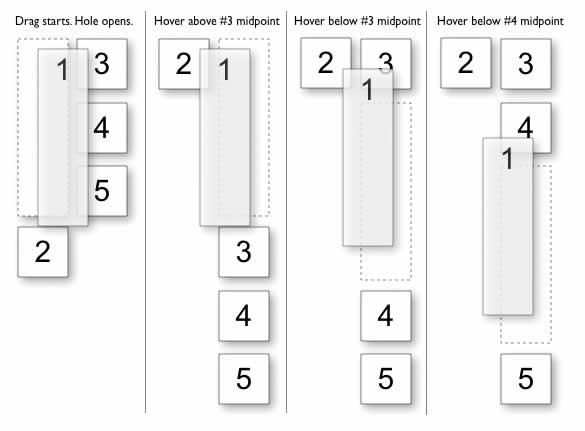
Changing elements on a page can be forceful. Traditionally, the popup or the dialogue box is an example of a rather unforceful behaviour where the overlaying element does not affect the underlying interface. It appears on top and nothing underneath changes other than a drop shadow or a grey out. This does not have to be the case however. One example of such more forceful push and shove behaviours can be seen during dragging operations. Bill documented this nicely in such a diagram. As an item is dragged and its position changes, the surrounding items are affected as they are pushed around. Using key frames, one can imagine the underlying rules during such an operation.
Finally, these push and shove rules do not have to be limited to dragging alone. As RIA elements become more flexible to resizing, dragging, animating or any other positional and size changes, such behaviours could be considered.
I found this example on Bill Scott’s superb companion flickr page for his upcoming
Designing Web Interfaces
Credits: Bill Scott
3 Responses to “Push & Shove Rules”













January 15th, 2009 at 8:19 pm
Lovely!
February 21st, 2010 at 3:39 am
cool pics
February 23rd, 2010 at 5:04 pm
cool pics