February 6th, 2010
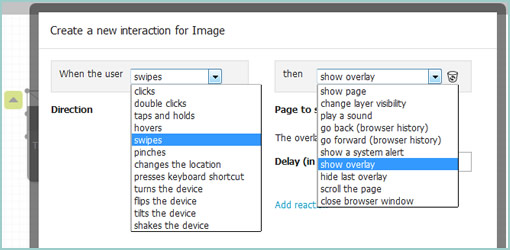
Justinmind has recently kicked off the beta phase of their next version of the Prototyper application. These guys are also running a contest for testers which will last up until February 26 and are giving away free licenses. Have a look, as the 3.0 version brings forth a new “Expression Editor” which allows to specify interactions by means of drag and drop. The instructions for downloading the beta apps for either MAC or Windows are available on their blog.
Posted in Announcements | 1 Comment »
February 4th, 2010

It’s probably nothing new that the sketch has been gaining quite some attention lately as a powerful design tool. Some UI designers have began to precede wireframing and prototyping with free-form pen and paper approaches that afford exploration and support a wider diversity of ideas. For over a year now, in my design process I’ve started doing just the same right after I picked up a set of markers and sketch pads. Looking back, sketching has been wonderful at giving rise to design representations that naturally act as conversation starters and therefore make sketching more so compatible with agile philosophies. However, traditional pen and paper has a few limitations which
over the last few months became noticeable. As a reaction to this, I grabbed an Intuos 3 from Wacom, installed Adobe Illustrator and began sketching electronically using a pen and tablet. Finding the new approach superior, I have doubts I’ll ever go back to paper and wanted to share some of the reasons why.
Scaling
Like it or not, design ideas need to scale over time and good tools provide room for such growth. One thing that I love about Illustrator (which paper lacks of course) is that the art board or workspace can be stretched as needed whenever concepts need the extra room. The flexibility to resize the canvas is a really great feature especially during early ideation when multiple screens need to be shown together to tell a meaningful story. On the same note, another way Illustrator excels is in terms of a scalable fidelity. Whereas early on in a project the amount of detail might be small, over time however, the fidelity of an electronic sketch has the potential to develop. In a vector environment it is super easy to take a small UI sketch, stretch it to a larger size, and inject more detail inside of it.
Ease of Editing
Yes, in the real world we have pencils, erasers and the ability to redraw or correct our sketches to some degree. We can however only correct our paper sketches somewhat before they becomes unreadable. This isn’t the case with anything electronic or digital where cutting, deleting, undoing, redoing, erasing is second nature. A very common scenario is to draw different screens and only learn eventually that it makes sense for the two or three screens to be placed together – something that is very easily done by reorganizing or repositioning on the computer. Another superb thing about Illustrator is the ability to select a line and just redraw it, causing it the take on the new form. This of course can be done an unlimited amount of times in an electronic tool.
Legibility
Although this might not be the case for everyone out there, I personally find that my hand writing is very hard to read. Unless I spent extra care and time to write legibly, I find that on the computer it is way easier and quicker to type out text that can be read by others.
Carelessness
When I am about to sketch on paper, knowingly that it will be harder to undo, I hold myself back and think twice before the ink or lead leaves a mark. This slow down or inefficiency can be easily overcome in the electronic world with a tablet pen. When I sketch electronically, this worry disappears as I know that I don’t have to generate the right ideas, but instead can easily correct myself if something needs adjusting. This careless quality of electronic sketching brings forth immense value by affording greater exploration to occur more freely.
Reuse
Illustrator allows to create symbols of artwork very easily which in turn speeds up exploration ever more. Let’s say you have the same screen or component which you want to use a number of times across your work. Dragging the selection into the symbols palette allows you to reuse or instantiate that artwork and still have the ability to edit it in one location with it updating throughout. This is simply a superiority that paper cannot compete with.
The above are the reasons why I moved in the direction of electronic sketching. Perhaps the use of paper can still be justified in collaborative sketching sessions when there are more than one designer at the table and the design activity happens simultaneously in real time. For the remaining times, I find that the electronic sketch offers advantages over paper that are just too good to pass.
Credits: Jakub Linowski
Tags: activity, agility, jakubs, sketch, user flow
Posted in Samples, Tools | 8 Comments »
January 29th, 2010

Recently a new version of the Pencil Project has come out which brings forth a set of new features. For those who don’t know the Pencil is an open source and community driven, UI design tool which originated as a Firefox extension (best extension of 2008). This new version however has stepped out of the browser and people can install this as a stand alone application. Other new features include the ability to interlink pages, export to various file formats, as well the creation of a Personal Collection (a library of sorts).
Another pretty cool feature is the Clipart Browser. The Pencil allows you to search the open directory over at clipart.org and insert SVG graphics straight into your mockup. Love it. :) Other than that, one minor area which could use some improvement is the handling of a group of items or reusing them across screens. Quite often UI tools either come with some sort of grouping or master functionality which seems to be missing here.
Give it a spin right here.
Tags: opensource
Posted in Tools | 3 Comments »
January 26th, 2010

Vincent, a friend of mine, has been tinkering with some new ways of portraying simple touch screen interactions on his Get Around application. He uses a big overlaid thumb with a set transparency to indicate the touch. For indicating a dragging action, the thumb also contains an arrow with a direction. Just thought to share this as I found it interesting. To refresh quickly, Elaine has also approached the same problem previously in a slightly different way.
Credits: Vincent Steurs
Tags: activity, draggable, wireframe
Posted in Samples | 7 Comments »
January 22nd, 2010

Traditional animators have been relying on sketching techniques of their own which I thought might be inspirational. Animators represent time with exposure sheets (aka. dope sheets) through which a large number of information can be conveyed to others. An x-sheet is pretty much a frame by frame representation of time to which notes can be layered on top. Some of these notes typically include information about: dialogue, camera angles, lighting, background and audio. Since timings of around 30 frames per second are standard, each xsheet is just a snapshot of a few seconds. Nevertheless, animators still find them useful as a communication artifact.
Here is what the people at Michael Sporn Animation studios have to say about these deliverables:
You see, when you get used to reading X-sheets, you see them as time. You don’t see the lines, you see seconds and footage, instantaneously. As an animator, you get an overview immediately of the scene; as a director you read the track, how the animator has constructed the scene, and what camera moves are indicated and why.
Here are a couple extra x-sheet samples.
Of course x-sheets work for a passive medium such as film and it’s questionable of how useful they might be for interactive web applications. Nevertheless, I still wonder if some of these ideas can be useful to our field. What other information can experience or interaction designers “layer” on top of the existing deliverables that we are typically accustomed to? Perhaps it would be interesting to combine a user flow representation with a learning curve or effort representation? What ever happened to representing sound in a UI sketch? What about a wireframe referencing an x-sheet sketch for the times when we do use animation? Hey, and what about a user flow with one axis dedicated to representing time consistently? Just thinking out loud.
Credits: Jun Falkenstein
Tags: activity, annotation, sketch
Posted in Inspirations | 4 Comments »
January 19th, 2010
I’m planning to update the little sketching project I started a while ago and I was curious if perhaps some people might want to contribute any ideas. I’m already planning to take in Nathanael’s feedback but am also open if perhaps others made use of this, and would like to share their thoughts. Ideas in the form of text or sketched samples, all are good. Let me know (email listed in the right hand column) :)
Cheers,
Jakub
Posted in Announcements | 6 Comments »
January 19th, 2010

Pidoco, is an online prototyping tool tool which supports a wide range of design activities. Users of this software can for example insert common wireframe elements onto multiple pages. If you drag and drop the freehand box, you can also sketch out line drawings more flexibly (although this still feels a bit jagged). Pidoco also supports a collaborative environment where multiple designers can work together on the same prototype, and allows you to keep track of a version history. On the same note, Pidoco documents can also be reviewed by others and annotated with notes. One interesting way of handling reusable elements is with the global layers feature. The visibility of layers basically can be toggled across any page which allows more flexibility. Of course, like any other similar tool, Pidoco also allows to export the work into interactive prototypes that can be bound with links.
One area where Pidoco truly differentiates itself from the rest of the competition is with the ability to run remote usability tests with the prototypes it generates. Designers can send out a link and invite users to participate in a usability test which the software also records and stores for future reference. I wasn’t able try this feature out, but it definitely looks pretty useful. Nice job!
Sign up for the 30 day free trial.
Posted in Tools | 2 Comments »
January 16th, 2010

Batiste Bieler has just recently released an wireframing tool with both the python source and a demo available publicly. The tool, as its tagline implies, is quite simple and looks like it is just the beginning of a project. For now, users can start of by creating a wireframe by first specifying a grid on which to work on. Further, components can be inserted into the page from a pull down menu. I believe that in the next release Batiste will be opening up an administrative panel to allow users to create new components. Of course all components are dragable, resizable and editable. Excited to see some grassroots projects happening.
Check out the demo.
Credits: Batiste Bieler
Tags: opensource
Posted in Tools | 2 Comments »
January 12th, 2010

Clickframes is an open source software requirements tool which takes an XML notation as a source and generates a clickable document. First the requirements are written in the form of an appspec, are then fed into an interpreting tool (such as the hosted CLIPr), which in turn generates interactive documentation. Now don’t get me wrong, the generated documentation looks nothing like traditional wireframes. Clickframes are requirement abstractions which do not contain any structural information about various UI elements’ position or size (typical wireframe meat). Clickframes do however indicate the input elements which reside on each page as well as the paths of actions and the resulting outcomes that users can take. I find this interesting as this tool takes a stronger stand on the element of time as represented through such interactions. Hence, this tool visualizes cause and effect of user interactions explicitly, as opposed to having to be discovered.
Another definite Clickframe analogy which comes to mind is that of an interactive and auto-generated page description diagram. What both page description diagrams and clickframes in my opinion lack is the concreteness of elements in a given space which have been traded off for abstraction. For this, I assume there would be designers who start of projects by sketching and designers who begin by writing requirements. Perhaps Clickframes also resonate with what Ryan Singer of 37signals was speaking of when he mentioned that before the pen is laid to paper, a UI model should exist.
Credits: Jonathan Abbett & William Crawford of Beacon16
Tags: opensource
Posted in Tools | 4 Comments »
January 7th, 2010

Plumb is an open source tool (GitHub source) for drawing out placeholders on top of the Blueprint framework. You can simply draw out the boxes and it will automatically create the HTML for you. So what’s in it for me you ask? I noticed in the past that there is a community of HTML prototypers out there who like to do their interactive wireframes with grid systems in their most native form. With that, I thought this tool might be interesting to some. Enjoy.
Oh, and if you haven’t noticed already, I have a thing for open source software. Hence a separate opensource tag just appeared in the right navigation bar to separate out these types of projects. Cheers!
Credits: Michael Daines
Tags: opensource
Posted in Tools | 3 Comments »