Sketchboarding

May 5th, 2009


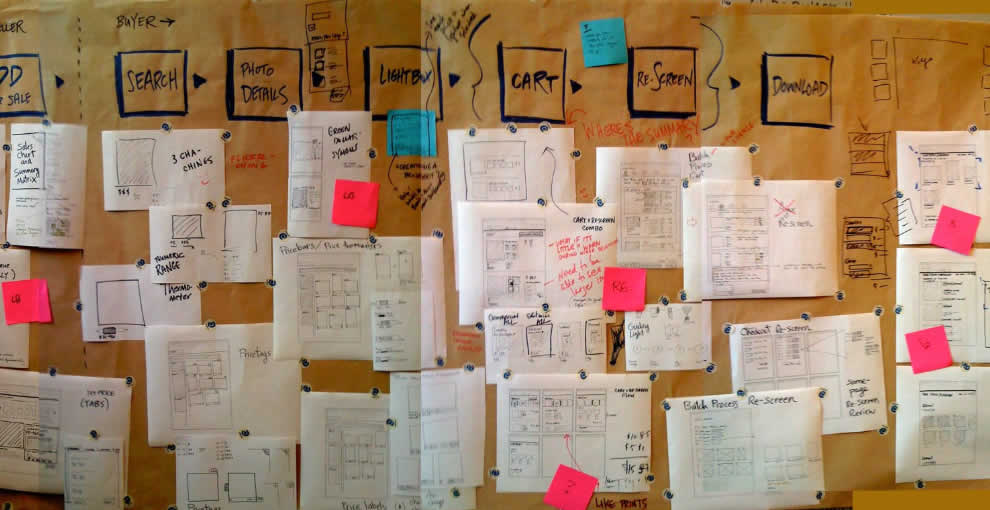
A collaborative sketching technique has been emerging from the people over at Adaptive Path, known as sketchboarding. A large sheet of paper is hung on the wall onto which additional pieces of paper are attached with the help of drafting dots, containing sketched ideas of different levels of fidelity. I find at least two things that stand out with this approach. First of all, inspirational material such as personas or requirements are used as a starting point to drive the conceptualization process. These materials are intentionaly placed on the left hand side of the sketchboard in close proximity to the wireframes. Secondly, the defined space where ideas are to be attached is stretched by design which invites exploration and refinement. Overall, this collaborative sketching technique works nicely as it also provides a bigger picture which can also be taken down and physically relocated if necessary.

Brandon has covered the technique quite in depth along with a video. Dan and Leah have also done a presentation about the approach in PPT format. More recently also, the following samples (along with templates) have been presented at the 2008 CanUX conference.

Credits: Leah Buley, Dan Harrelson & Brandon Schauer

  • del.icio.us
  • Twitter
  • Tumblr
  • Facebook
  • Digg
  • email
  • Mixx
  • Google Bookmarks
  • StumbleUpon

19 Responses to “Sketchboarding”

  1. Tyeshasnow Says:

    I like that you can layer all of the different iterations, leaving a record of early ideas. Then all you have to do is move it from the bottom to the top if the idea becomes valid again.

    I also think this is just a wonderful artifact. Working in the digital, it is nice to have a physical representation of the work we do. This image holds so much: insights, ideas, collaboration, long days, laughing, challenges, experience, innovation, all of it. Really nice. Thanks for sharing!

  2. Suffian Says:

    We did something like this during our redesign of Maybank2u.com. It's a great idea. Sometimes you need to use a whole wall to map things out, especially if you're restructuring a big site.

  3. Jakub Linowski Says:

    Agreed. I like how it's possible to see alternatives or iterations on the vertical axis. Perhaps it makes it even a bit similar to http://wireframes.linowski.ca/?p=539

  4. Tyeshasnow Says:

    Exactly. I was thinking about that, that was a good one too.

  5. Starting Out Organized: Website Content Planning The Right Way - Smashing Magazine Says:

    [...] as described on Usability.govContent Inventory (Boxes and Arrows)Paper and SketchboardsSometimes paper just feels good. The free form allows for incredible expressiveness, and nothing is faster for [...]

  6. Starting Out Organized: Website Content Planning The Right Way | Web Design Cool Says:

    [...] paper just feels good. The free form allows for incredible expressiveness, and nothing is faster for [...]

  7. Starting Out Organized: Website Content Planning The Right Way | rssubmit.com Webmasters-Blogs-Resources Says:

    [...] paper just feels good. The free form allows for incredible expressiveness, and nothing is faster for [...]

  8. Starting Out Organized: Website Content Planning The Right Way | Best Web Magazine Says:

    [...] [...]

  9. Starting Out Organized: Website Content Planning The Right Way | Web Development News Says:

    [...] paper just feels good. The free form allows for incredible expressiveness, and nothing is faster for [...]

  10. Starting Out Organized: Website Content Planning The Right Way | DesignerLinks | Home to Web design news, jQuery Tutorials, CSS tutorials, Web Designing tutorials, JavaScript tutorials and more! Says:

    [...] as described on Usability.govContent Inventory (Boxes and Arrows)Paper and SketchboardsSometimes paper just feels good. The free form allows for incredible expressiveness, and nothing is faster for [...]

  11. Starting Out Organized: Website Content Planning The Right Way | CMS Code Says:

    [...] paper just feels good. The free form allows for incredible expressiveness, and nothing is faster for [...]

  12. TG Designer » Starting Out Organized: Website Content Planning The Right Way Says:

    [...] paper just feels good. The free form allows for incredible expressiveness, and nothing is faster for [...]

  13. Starting Out Organized: Website Content Planning The Right Way « Top 10 Web Hosting Says:

    [...] paper just feels good. The free form allows for incredible expressiveness, and nothing is faster for [...]

  14. Starting Out Organized: Website Content Planning The Right Way | Awesome Pixels Says:

    [...] paper just feels good. The free form allows for incredible expressiveness, and nothing is faster for [...]

  15. Web site content planning | Digima Says:

    [...] paper just feels good. The free form allows for incredible expressiveness, and nothing is faster for [...]

  16. Starting Out Organized: Website Content Planning The Right Way « Hindgrindr Says:

    [...] paper just feels good. The free form allows for incredible expressiveness, and nothing is faster for [...]

  17. Starting Out Organized: Website Content Planning The Right Way | News, GTA, Sports, Business, Entertainment, World, Breaking - dasty.org Says:

    [...] paper just feels good. The free form allows for incredible expressiveness, and nothing is faster for [...]

  18. | DeerflyDesigns Says:

    [...] paper just feels good. The free form allows for incredible expressiveness, and nothing is faster for [...]

  19. Elene Quattlebaum Says:

    G’day, It’s great to find a good blog like this one. Would you mind if I use some of the info here, and I’ll leave a link back to your website?