








Computer Based Sketchy Wireframes
March 2nd, 2009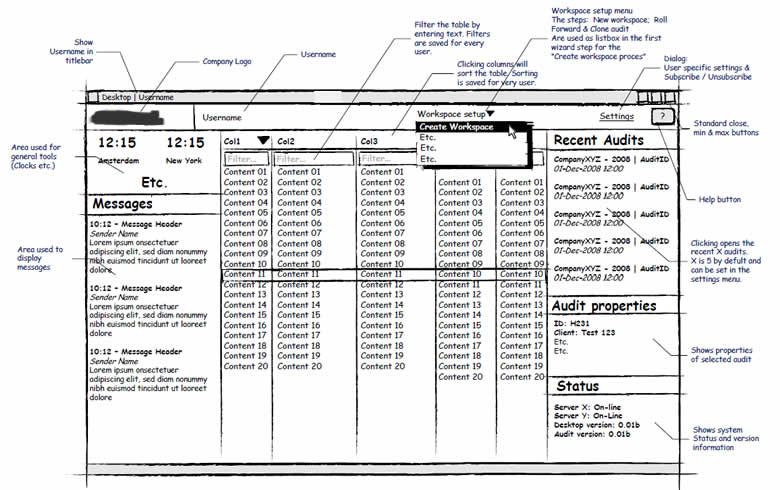
Jumping over to the computer does not necessarily mean that the wireframe ought to look rigid and clean, suggesting a higher degree of completion. Occasionally, the designer still feels the need to communicate the interface with a style which invites change by suggesting incompletion. One way of doing this is by means of a more sketchy style. Here is a sample of Hans using Visio loaded with a sketchy stencil designed by Niklas Wolkert. Jonathan Abbett has later on revised the stencil here.
Credits: Hans Nieuwenburg
11 Responses to “Computer Based Sketchy Wireframes”













March 2nd, 2009 at 2:01 pm
Hi there. My little wireframing tool (Balsamiq Mockups, http://www.balsamiq.com/products/mockups ) uses a sketchy stencil exactly to avoid the perception that the wireframe is a working prototype, and to help stakeholders focus on the app or site's structure instead of gradient colors, icons etc. I'd love to hear your thoughts about it. I've been following your blog since it started, excellent work, thank you!
March 2nd, 2009 at 2:25 pm
Omnigraffle users can also install a stencil to enable sketchy wireframing http://www.graffletopia.com/stencils/414
March 2nd, 2009 at 3:03 pm
that looks like a great tool! If it weren't $79 dollars I would consider buying it, but the free version could work for now. Keep in mind there are lots of student designers out there! <– :-P
March 3rd, 2009 at 8:42 pm
I would love to see a roundup of wire frame tools – web based especially, from free to $$$.
March 3rd, 2009 at 10:12 pm
Thanks for the suggestion. I might have a try at something like this in the future.
March 4th, 2009 at 12:26 am
Yes! The 414 stencil is wonderful. It's neat, inviting and I get a great response when I use it. I put some examples up on my blog: http://uxpillow.blogspot.com/
April 6th, 2009 at 7:13 pm
Every time i come here I am not dissapointed, nice post
July 28th, 2009 at 2:13 am
There are excellent sketchy wireframe templates available at no cost from http://graffletopia.com/ for IAs who –like me– use OmniGraffle.
(I have no associate with the website; I just put those free stencils to work for my clients.)