Posts Tagged ‘user flow’

UI Flow Shorthand Notation

Tuesday, September 22nd, 2009


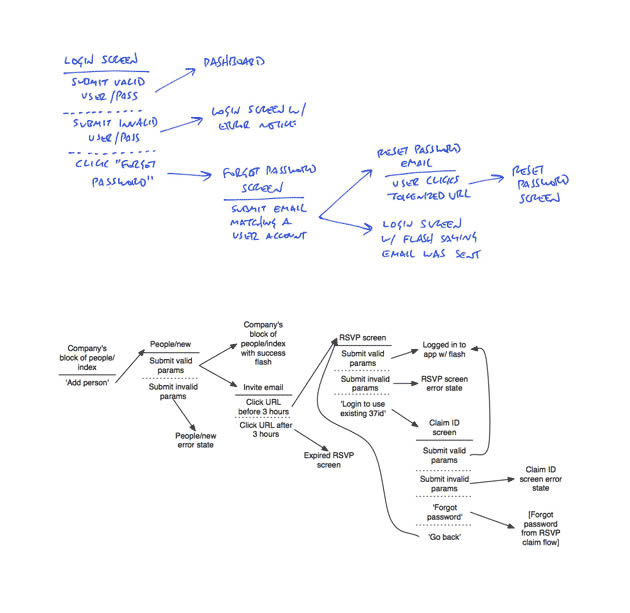
Amongst screens and wireframes, as interaction designers it is always important to consider the time element which binds and glues interface forms with human activity. Ryan Singer of 37signals just wrote an awesome little article about a quick way of noting down one of the common time-based documents we deal with – user interface flows. His shorthand version of a flow relies on making clusters composed of interface states or screens (above a horizontal line) and the actions which users take (below a horizontal line). These interface-action combinations are then transformed into a flow with the help of arrows that show possible sequences.

As basic as the approach sounds, it offers something quite unique in its potential for flexibility. Interestingly, Ryan has figured out a new way of how to represent alternative user actions per each screen (something I haven’t seen done before). These various actions which the users may take, can be separated out using a dotted line. More so, the notation also allows to visualize combined interface results stemming from a single action with the help of forking or branching arrows.

Overall, in an agile fashion, Ryan does not give much weight to these documents. Just like any other light and sketchy work, he hints at these flows being ephemeral and perhaps even a bit self-targeted:

Now don’t forget: all diagrams are destined for the garbage. The meaningful work is work that directly affects our customers as screens they can see or code that functions. But we still need to communicate and manage our work along the way. This shorthand has met a bare minimum for me to get a flow out of my brain in order to move on to other things. I hope it’s useful for you too.

Credits: Ryan Singer

Mixed Scale Wireflow

Thursday, August 13th, 2009


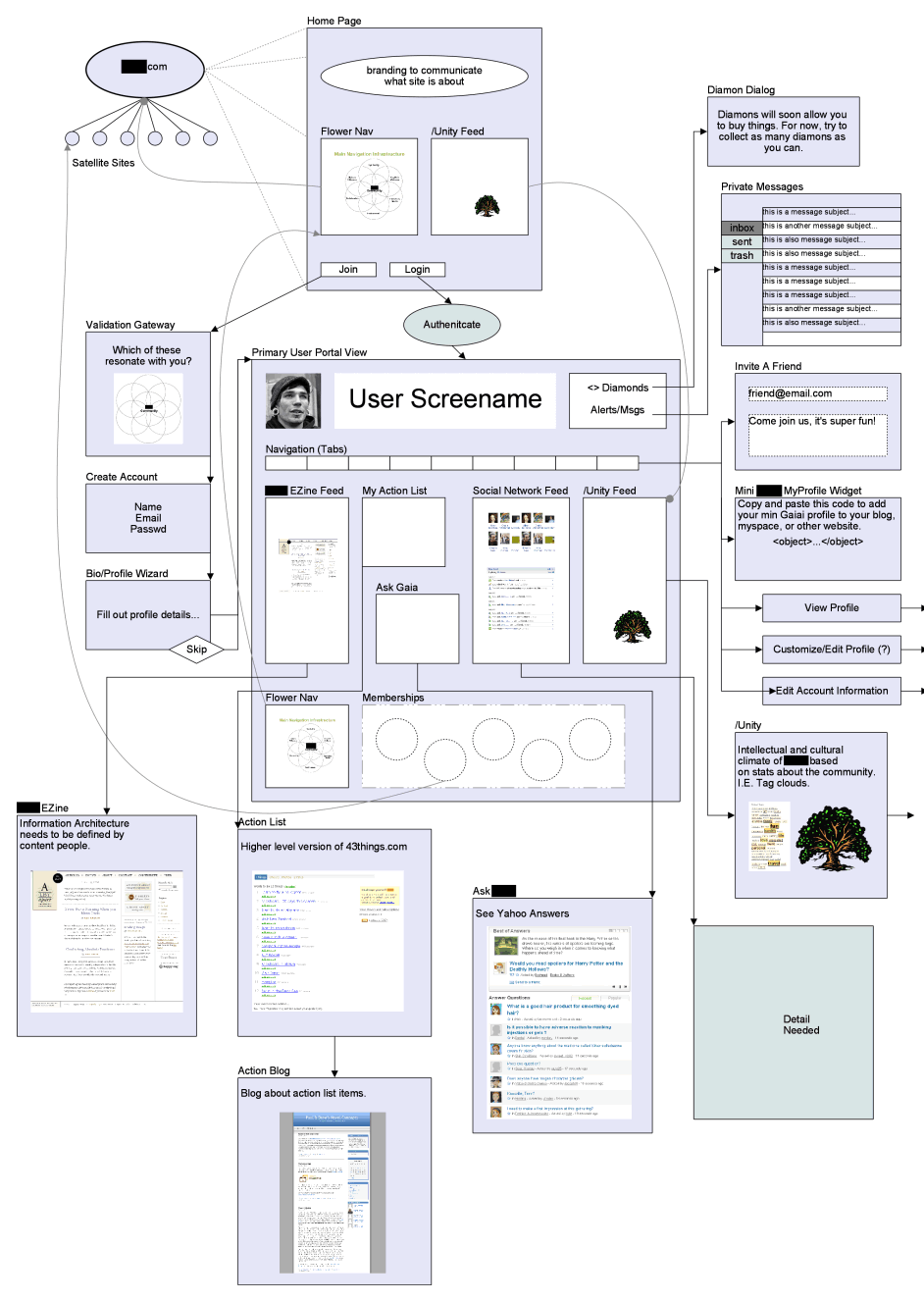
Scott’s sample shares resemblance to the previously shared wireflows posts here and here. One thing it does a bit differently however is that it combines interfaces representation which differ in size or scale. Larger screens are mixed with smaller ones. More so, this example here also represents both interface screens (or what the users see), as well as user activity (or what the user does).

Credits: Scott Dudley

Sketchboarding

Tuesday, May 5th, 2009


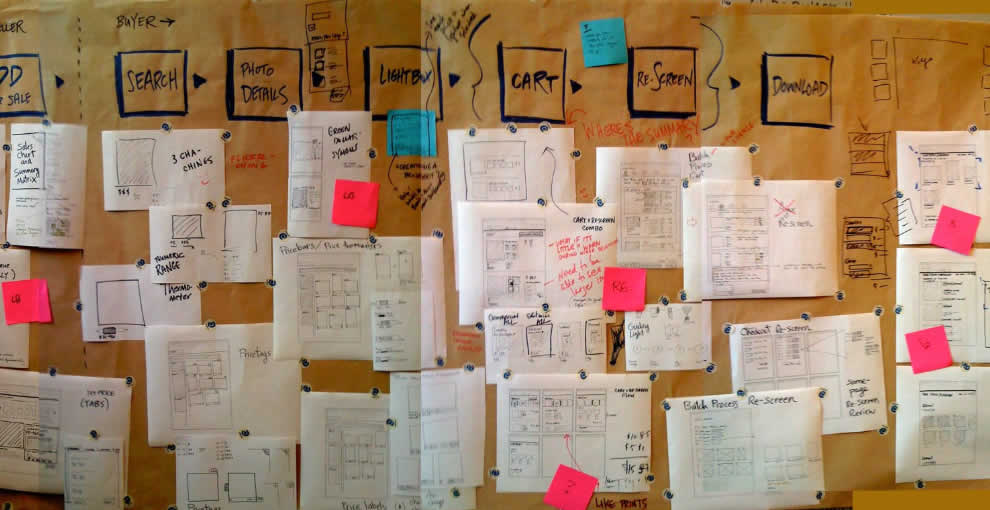
A collaborative sketching technique has been emerging from the people over at Adaptive Path, known as sketchboarding. A large sheet of paper is hung on the wall onto which additional pieces of paper are attached with the help of drafting dots, containing sketched ideas of different levels of fidelity. I find at least two things that stand out with this approach. First of all, inspirational material such as personas or requirements are used as a starting point to drive the conceptualization process. These materials are intentionaly placed on the left hand side of the sketchboard in close proximity to the wireframes. Secondly, the defined space where ideas are to be attached is stretched by design which invites exploration and refinement. Overall, this collaborative sketching technique works nicely as it also provides a bigger picture which can also be taken down and physically relocated if necessary.

Brandon has covered the technique quite in depth along with a video. Dan and Leah have also done a presentation about the approach in PPT format. More recently also, the following samples (along with templates) have been presented at the 2008 CanUX conference.

Credits: Leah Buley, Dan Harrelson & Brandon Schauer

UML State Charts

Monday, March 9th, 2009


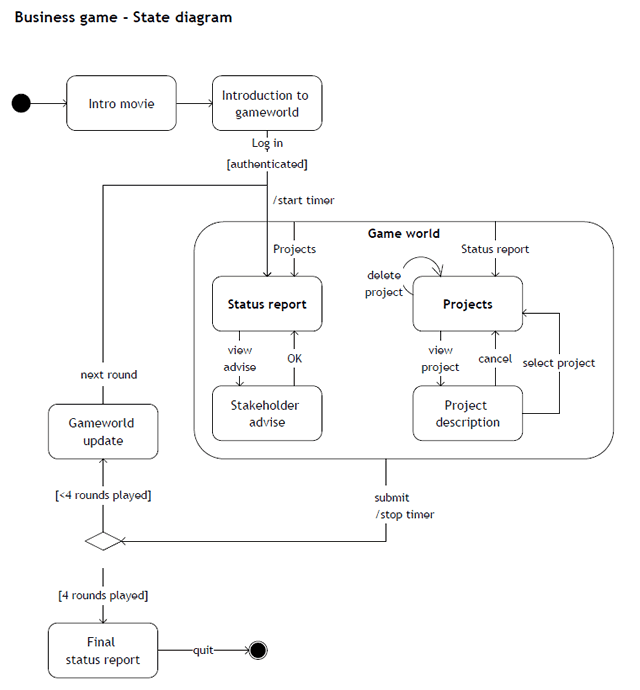
Here is an interesting way of approaching state changes using UML notation, and more specifically state charting. Perhaps the learning curve of documenting such technical interactions is not the lowest. However, once the team agrees on using such an advanced notation system, the represented interactions and state changes can be explored with greater accuracy and detail. Some interesting symbols include: loops which imply refreshes; brackets which suggest conditionals; forward slashes which suggest system actions; and larger rounded area containers representing nested states which are always accessible.

Yohan also sent me two interesting UML references. One simpler PDF reference explains very well the notation used in the above example, and a second extended reference explains additional UML diagramming notations.

Credits: Yohan Creemers

Sketching Alternative and Social Activities

Friday, February 20th, 2009


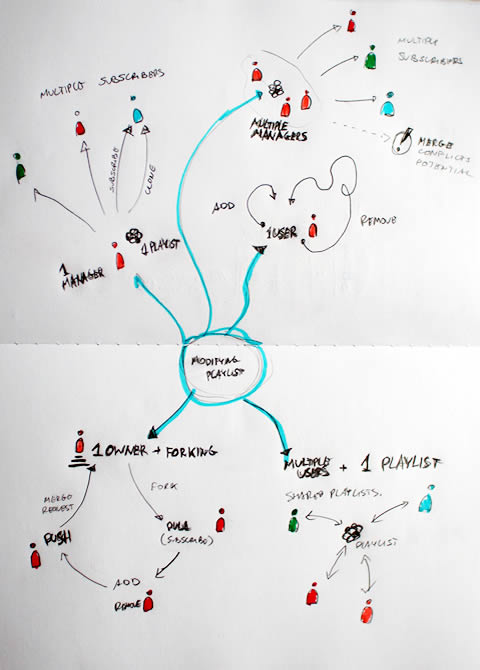
Recently as I was thinking about an assignment of designing a new playlist system at work, a number of ideas collided all into one and resulted in this design sample. The desire was to explore alternatives, quickly, of high level activities, which would have to support interactions between a number of actors or people. So I jumped back into pencil, paper and marker mode. As simple or obvious as it may seem, what I think might of worked well worth noting is the use of colours to denote different (or same) people. Another thing that perhaps worked out was the use of one activity as a starting point in the center and then branching out toward alternatives.

I think this little sample was influenced by other’s work as well worthy of noting. First of all, here at TU Delft we were exposed to quite a bit of mind mapping exercises which in a way resemble the interface sketches of Jonas Löwgren. Then again, this sample also shares the high level characteristics of a user journey submitted by Steve Johnson. Finally, as I’ve written in my personal blog I’ve also began questioning the sterility of one path user flows wondering about how to explore the diversity of activities.

The sample isn’t perfect, and as is argued in Pencils before Pixels, the lower the fidelity of the sketch the harder it is to use it to communicate with others. However when I showed the sketch to others, and supported the sample verbally, it enriched the conversations.

Credits: Jakub Linowski

State Level Wireflows and Transitions

Wednesday, February 4th, 2009


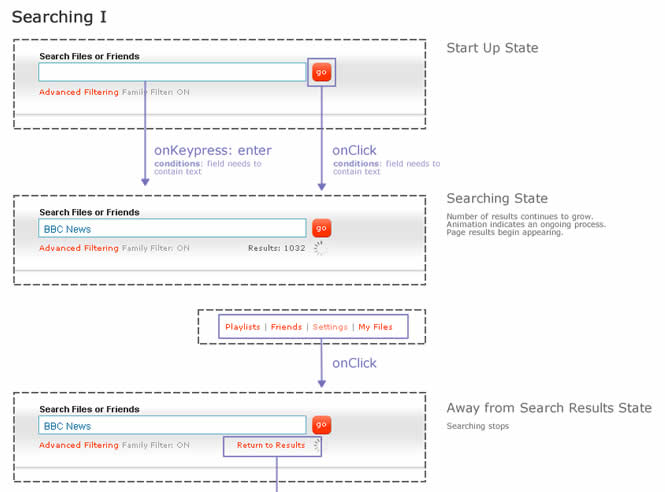
How do we document states changes when the page gives way to richer interaction? Here is one sample of my own work where I began to document state changes in a separate document away from the wireframes. Having access to detailed visual samples I cropped parts of the interface and layered flow arrows to represent these interactions. Typically however, these would not be so stylistically detailed and would probably be more wireframe like, or even sketched if speed mattered more.

Now to the meat of this sample. There are at least two things that I find useful which come to mind when documenting such interactivity in detail. First of all, transitions matter. Bill Buxton recently mentioned in his latest book, Sketching User Experiences, that interaction designers have too much focused on the states and not enough about what is in the space between them. To fill the states gap I personally find it interesting to seek inspiration about transition possibilities from JavaScript events such as the ones provided by jQuery. There are quite a bit of these events available and they range from key presses to double clicks, to mouse scrolls. Secondly, I sometimes complement events with conditions. Conditions are basically some form of written logic which applies to the event. For example: sometimes a state does not change on a mouse click alone, the mouse click has to be held down for more than 3 seconds and only then the new state kicks in. To represent these conditions, I put them right under the events in a smaller font. This is just one way of doing it. If you have other ways, please don’t hesitate to submit.

A word of caution. This one can be considered a form of a detailing technique where it’s really up to your best judgement when to perform. I definitely don’t do this for all parts of an interface. As others have mentioned in the past, sometimes things like this are best resolved through dialogue with the developers while the prototype is being built. Sometimes however, when the user experience can really be affected by how these states transition, it really helps to put it on paper.

Here is also an interesting article on the same technique.

Credits: Jakub Linowski

Page Level Wireflows

Tuesday, February 3rd, 2009


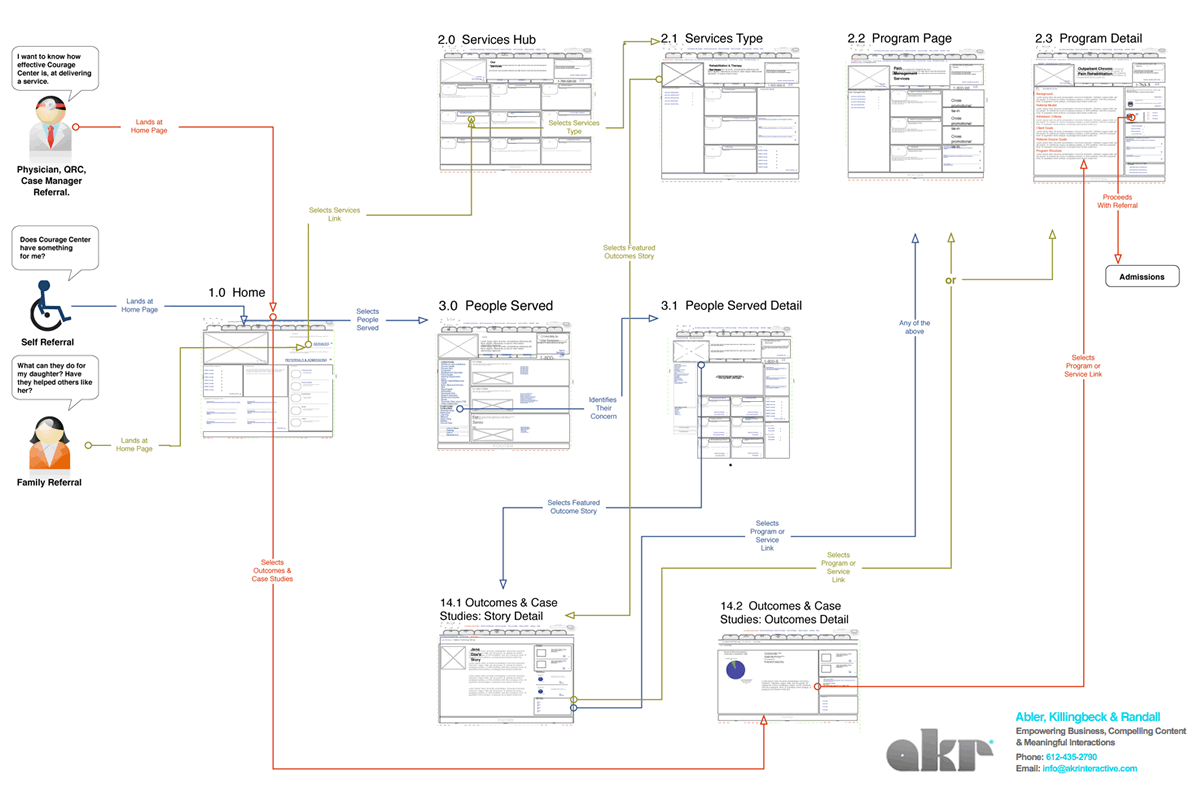
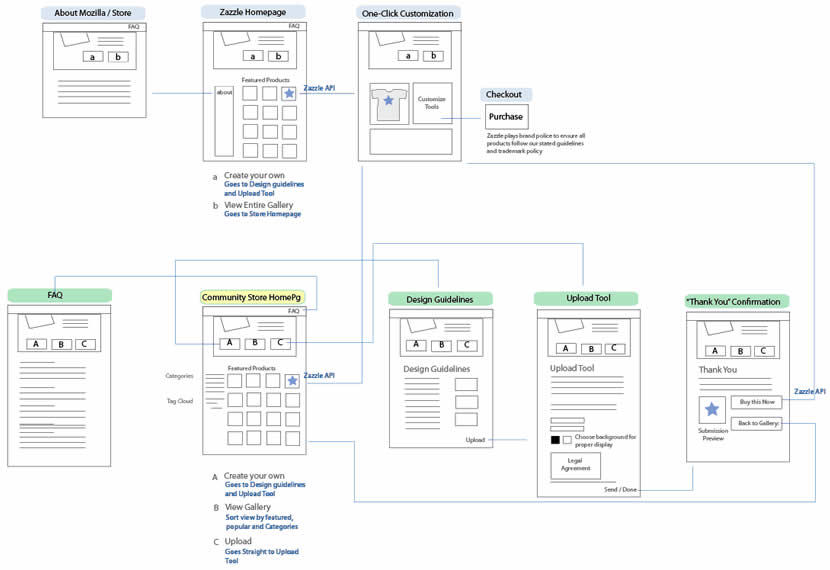
Tara has been designing the Mozilla Community Store and did a couple of wireflows at the page level. Having shrunk down the wireframes to thumbnails, this diagram provides a very nice overview of page-to-page link relationships that the user might take. nform Trading Cards however warn us that these documents could be very labour intensive if the design changes (which I also experienced). Now what if this view was automatically generated with our favourite design tools?

Credits: Tara Shahian

Error Handling in Wireframes

Monday, January 19th, 2009


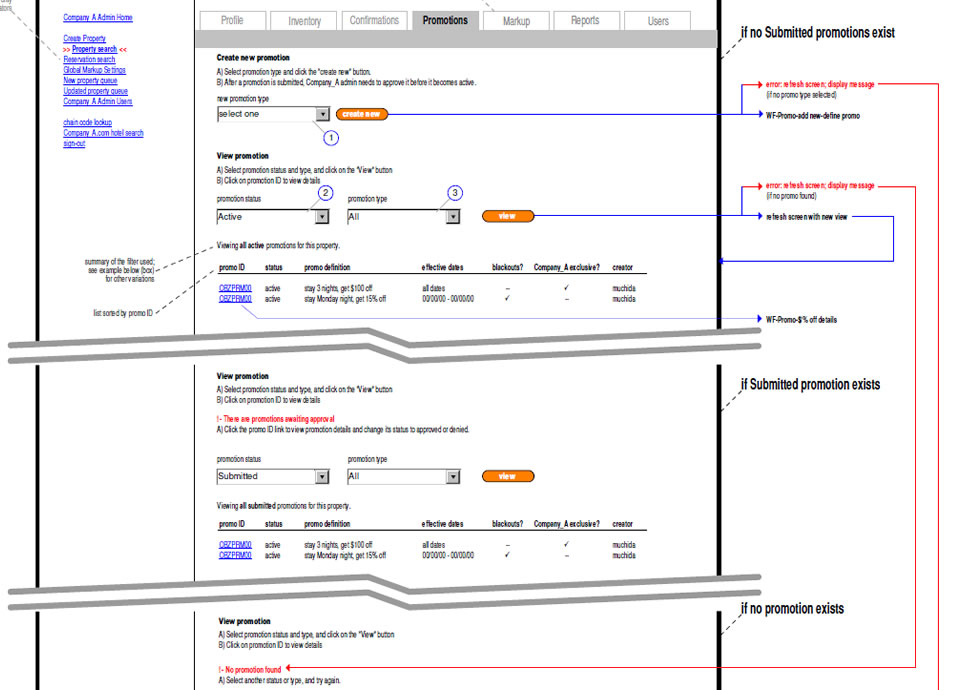
As we begin to think about, sketch and specify multiple interface states, it quickly becomes apparent that error handling is one potential candidate which is rich in state complexity. Looking around for an example of how to document errors I found a very interesting sample of such an error wireframing technique. Minoru Uchida has agreed to showcase and share it here.

The technique is quite simple. Similarly as in the previously described In Page Events example, coloured lines are used to denote user actions. If however there is a conditional error, a red arrow is used to guide the reader to a new page section with the error message in red. The nice thing about this technique is that the page can be further divided horizontally and only a few elements which change are duplicated. The remaining elements such as the header and footer are shared across the full page.

Credits: Minoru Uchida & Mark Hines

User Journeys

Wednesday, January 7th, 2009


Steve sent me a User Journey sample today and I thought it was pretty interesting. Besides there being an article on Boxes and Arrows on this technique, perhaps I can add my 5 cents on what I am seeing here. Other than the iconographical style, two important ideas become apparent. First, the duration of the interactions in this visual are wider than usual. Typical user flows represent quite narrow time lengths, whereas the deliverable shows interactions spanning out over the weekend, and even a month afterwards. Secondly, the computer screen is represented as only one item in a bigger context of the physical world. The little people here interact with other physical objects such as magazines, MP3 players and PDAs. Taken together I find this sample as an interesting way to think and represent activity beyond the desktop screen within a richer reality.

Here is also what Steve writes:

I have been working on creating these 3D characters for some time now to bring to life some (often boring) User Journeys for our clients.

I have used them several times in pitches and key stakeholder meetings and they seem to be well received, while at the same working as a good platform to get our ideas across. Clients seem to get things more easily when they are illustrated or drawn out in front of them. I have also found people are more likely to contribute in meetings if they see ideas detailed in this way. If I have the library of assets with me, I can easily (using omnigraffle or equivalent) add their idea to the diagram in the meeting, increasing their sense of participation.

And just because you are illustrating your User Journey it doesn’t mean you are trying to dumb the information down. Before I create a diagram like this one I make sure I sketch out my ideas with a pencil and paper before hand to ensure all bases are covered.

Credits: Steve Johnson