Archive for the ‘Samples’ Category

Sketching Alternative and Social Activities

Friday, February 20th, 2009


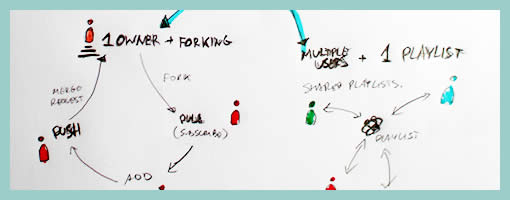
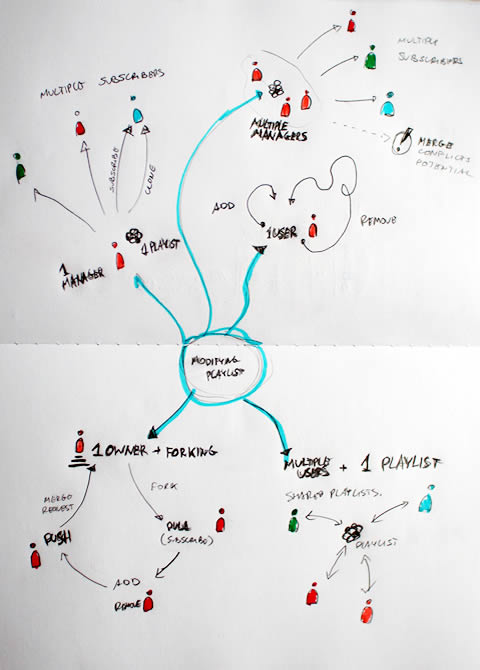
Recently as I was thinking about an assignment of designing a new playlist system at work, a number of ideas collided all into one and resulted in this design sample. The desire was to explore alternatives, quickly, of high level activities, which would have to support interactions between a number of actors or people. So I jumped back into pencil, paper and marker mode. As simple or obvious as it may seem, what I think might of worked well worth noting is the use of colours to denote different (or same) people. Another thing that perhaps worked out was the use of one activity as a starting point in the center and then branching out toward alternatives.

I think this little sample was influenced by other’s work as well worthy of noting. First of all, here at TU Delft we were exposed to quite a bit of mind mapping exercises which in a way resemble the interface sketches of Jonas Löwgren. Then again, this sample also shares the high level characteristics of a user journey submitted by Steve Johnson. Finally, as I’ve written in my personal blog I’ve also began questioning the sterility of one path user flows wondering about how to explore the diversity of activities.

The sample isn’t perfect, and as is argued in Pencils before Pixels, the lower the fidelity of the sketch the harder it is to use it to communicate with others. However when I showed the sketch to others, and supported the sample verbally, it enriched the conversations.

Credits: Jakub Linowski

Multiple Element Changes Using Miniframe References

Thursday, February 19th, 2009


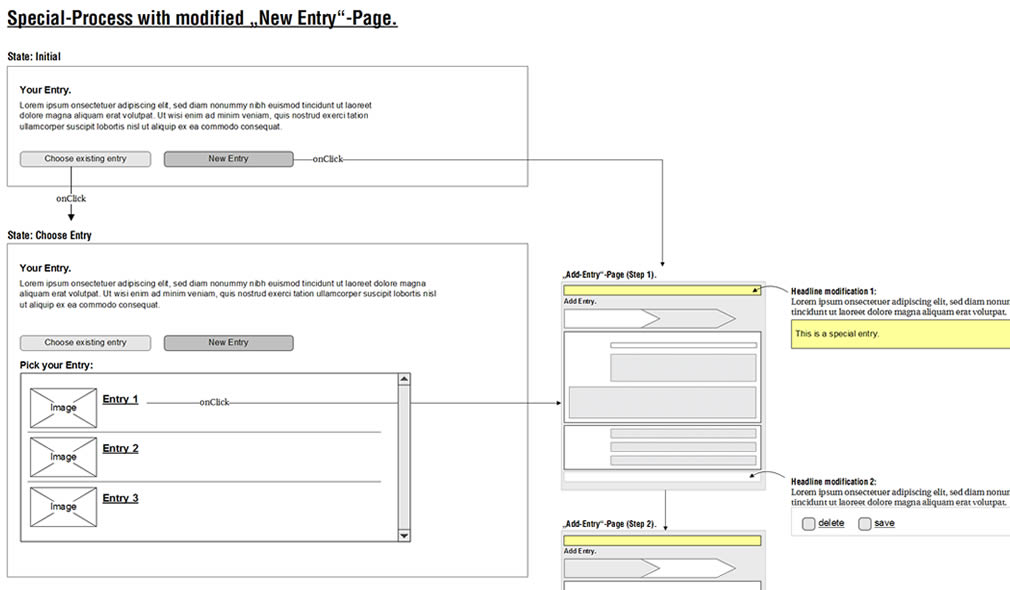
Here is a sample revisiting the problem of exploring multiple element changes all over the screen as a result of an interaction. Traditionally a full wireframe would have to be redrawn in order to document such subtle and multiple changes. Here is a quick solution that avoids having to wireframe the full page and thus decreases effort and increases document flexibility. Fabian has achieved this by combining state based wireflows with miniframes which act as references for the elements which do change. Overall, this document reminds us of an important consideration relevant in wireframing richer interactions. This being that one interaction can have multiple element reactions. Just to recap, Bill Scott has used an alternative method of documenting a similar case with a multiple elements & state conditions matrix.

Credits: Fabian Nöthe

High Level Layout Alternatives

Tuesday, February 17th, 2009


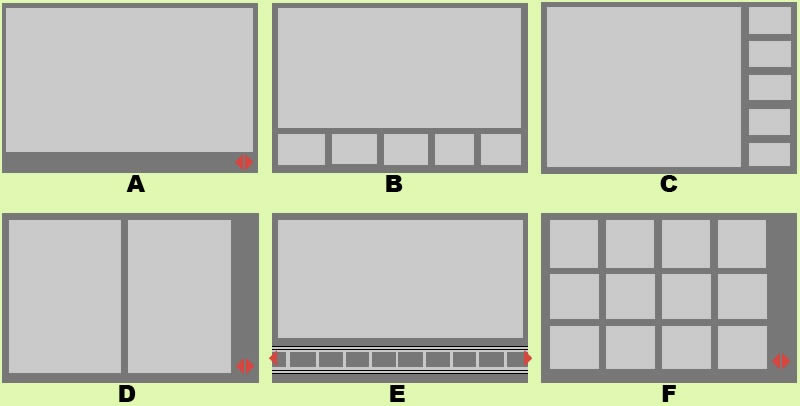
Here is a sample exploring the possibilities of various layout approaches in the early stages of a design process. Consecutive lettering has been used to suggest multiple interface alternatives. The variations however only explore very rough structural or navigational alternatives. The level of fidelity is very much devoid of detail. I continue to wonder what other designers do when they want to explore numerous alternatives of more detailed interface elements or screens which are a bit further in the design process. Would you have samples of something like that? If so, please submit.

The source of the file can be found on flickr.

Credits: Bram Pitoyo

Sitemap References

Sunday, February 15th, 2009


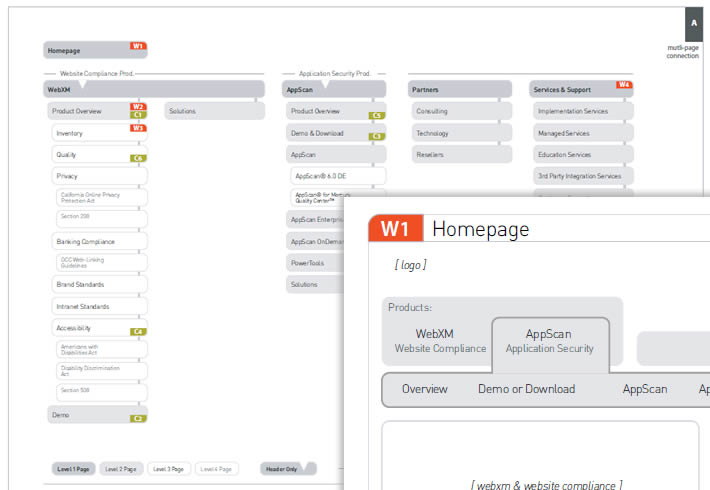
In a way, sitemaps can be thought of as a unifying table of contents of an information architecture project. They provide a way to zoom out and view the whole organization from a bird’s eye point of view. As interesting as things look from the clouds, one can fly around only for so long, and information architects often also allow to come back down to the wireframe or page level. This zooming back in is often done through some form of referencing. Here in this sample I began referencing at least three things: wireframes, content inventories, and additional sitemap pages. Wireframes are referenced with a red “W#” stamp, content inventories with a “C#” stamp, and additional pages with upper corner blocks. Some time ago in the past I also referenced user scenarios at this level. The list of references could possibly be expanded to accommodate other item as well.

Credits: Jakub Linowski
User Type Views & Annotations with Polypage

Friday, February 13th, 2009


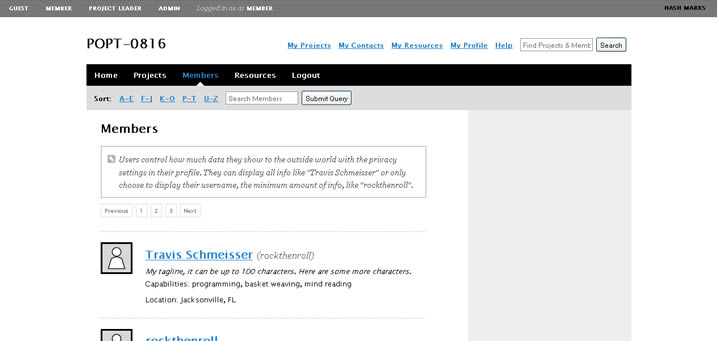
Here is another very good Polypage HTML wireframe submitted by Joey Marchy from nGen Works. Two interesting uses of Polypage make themselves visible in this sample. First, on the upper left hand side, all of the various user types have been defined. Toggling them gives a good sense of what all of the various wireframes will look like for that particular user. Secondly, Polypage has also been used to annotate the wireframes and this is accessible through the upper right corner by means of such tags as “user roles” and “hash marks”. The really nice thing about this annotation technique is that no longer are the actual annotations separated somewhere in the right hand side from the main wireframe, but instead are contextualized right in the wireframe itself. This allows people reviewing the wireframe to read the annotations quicker as opposed to having to translate number references into actual notes, as it is done traditionally.

Joey writes:

We created a functional HTML prototype to accomplish two goals: get client signoff on all application interaction and provide a roadmap for the development team building the application. We used a combination of PHP and the awesome Polypage jQuery plugin to show the myriad of states between differing user levels and application states.

Credits: nGen Works

Whiteboard Wireframes

Wednesday, February 11th, 2009


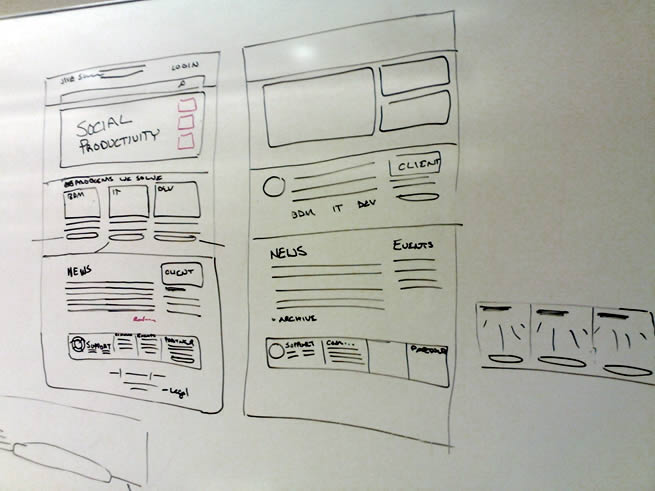
Sometimes it’s better to design collaboratively in the open instead of doing it from the safety of the solo oriented computer. If done right, more feedback can be harnessed quicker with higher quality returns. Agile programmers have been doing this with their paired programming approaches which apparently pay off by diminishing bugs and increasing code quality. Here is a sample from Michael drawing up wireframes on a whiteboard for the redesign of Jive Software’s website – visible and affording collaboration.

Credits: Michael Sigler

960.gs Grid Based Prototypes

Monday, February 9th, 2009

Just found a nice HTML prototype sample using the CSS 960 Grid System. The CSS grid allows to align elements more easily across pages. Although it can be said that the technique is perhaps more useful for developers, some people also use it to create wireframe prototypes. In addition, Mushabar Iqbal also ported the fluid grid to a jQuery template allowing for smoother template interactions. Adam Hawkins explains how to use the 960 CSS Grid System for interactive prototyping, but at the same time warns of the inflexibility and rigidness of such an approach. Apparently, once the grid foundations are laid down and multiple pages start making use of it, it becomes more difficult to adjust the grid. Finally, a Twitter follower (wrenbjor) also provided me with a nice and elaborate list of even more tutorials on the 960 grid.

Credits: Lachy Groom

Generic Content and Section Labels

Friday, February 6th, 2009


While designing, it’s not rare that at times detailing is avoided and more rapid exploration is favoured. This very much applies to wireframing as well and in particular content or section areas. When wanting to document such an area or content reference quickly, I fell into the habit of using the less than and greater than signs to suggest generic labels or variables. Using these signs allows to visually distinguish real content from the labels. In addition, this technique also allows for more granular fidelity in design documentation as some things are more detailed while others are left undefined. In a way then, using such generic labels moves wireframing one step closer toward sketching by allowing for such incompleteness.

A couple of years ago Dan Brown has also written about such different content representation techniques and also created a nice summary poster. It would be interesting however to see some stronger visual language or styling to help distinguish all of Dan’s different content representation types: actual, dummy, labelled, symbolic, and lipsum.

Credits: Jakub Linowski
State Level Wireflows and Transitions

Wednesday, February 4th, 2009


How do we document states changes when the page gives way to richer interaction? Here is one sample of my own work where I began to document state changes in a separate document away from the wireframes. Having access to detailed visual samples I cropped parts of the interface and layered flow arrows to represent these interactions. Typically however, these would not be so stylistically detailed and would probably be more wireframe like, or even sketched if speed mattered more.

Now to the meat of this sample. There are at least two things that I find useful which come to mind when documenting such interactivity in detail. First of all, transitions matter. Bill Buxton recently mentioned in his latest book, Sketching User Experiences, that interaction designers have too much focused on the states and not enough about what is in the space between them. To fill the states gap I personally find it interesting to seek inspiration about transition possibilities from JavaScript events such as the ones provided by jQuery. There are quite a bit of these events available and they range from key presses to double clicks, to mouse scrolls. Secondly, I sometimes complement events with conditions. Conditions are basically some form of written logic which applies to the event. For example: sometimes a state does not change on a mouse click alone, the mouse click has to be held down for more than 3 seconds and only then the new state kicks in. To represent these conditions, I put them right under the events in a smaller font. This is just one way of doing it. If you have other ways, please don’t hesitate to submit.

A word of caution. This one can be considered a form of a detailing technique where it’s really up to your best judgement when to perform. I definitely don’t do this for all parts of an interface. As others have mentioned in the past, sometimes things like this are best resolved through dialogue with the developers while the prototype is being built. Sometimes however, when the user experience can really be affected by how these states transition, it really helps to put it on paper.

Here is also an interesting article on the same technique.

Credits: Jakub Linowski
Page Level Wireflows

Tuesday, February 3rd, 2009


Tara has been designing the Mozilla Community Store and did a couple of wireflows at the page level. Having shrunk down the wireframes to thumbnails, this diagram provides a very nice overview of page-to-page link relationships that the user might take. nform Trading Cards however warn us that these documents could be very labour intensive if the design changes (which I also experienced). Now what if this view was automatically generated with our favourite design tools?

Credits: Tara Shahian