Posts Tagged ‘sketch’

OmniGraffle Wireflows

Tuesday, December 29th, 2009


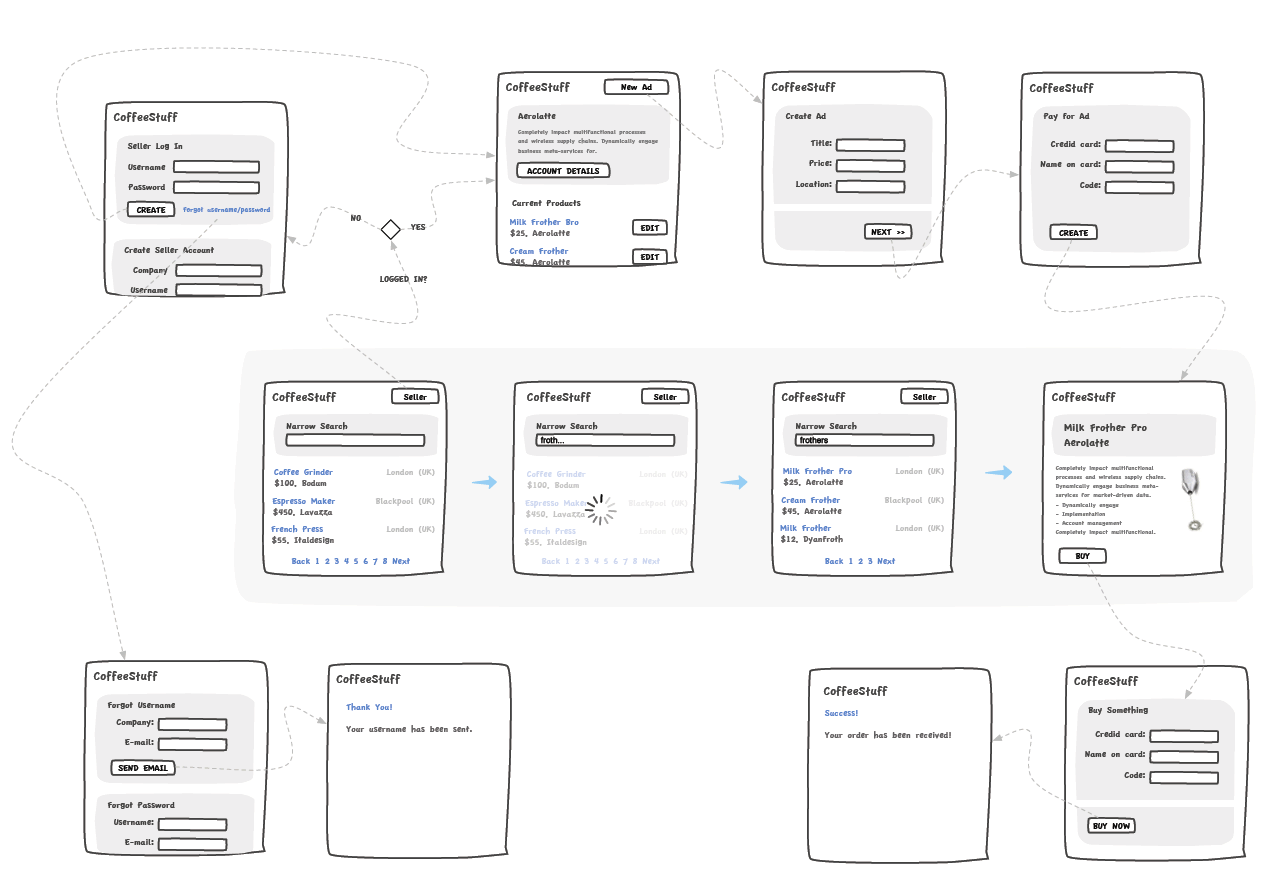
Andreas just sent in a sample of a wireflow done in Omnigraffle (here are a few more) which I thought was an interesting show. It contains a sketchy style, conditionals, and groups a set of pages together with a grey background area. Most recently, this way of working is also my personal preferred approach to communicating UI concepts. Not only does a deliverable like this convey activity more clearly, but it also provides a sense of scope in one snapshot. One problem with these wireflows which I’ve seen in the past is when the design proceeds further and more detail is required. Often in this situation I fall back and develop wireframes. This however duplicates the documentation which is undesirable from a maintenance perspective. Come to think of it, perhaps there is a way to reference occasional detailed wires, on demand, from within a wireflow diagram. Anyhow, here is what Andreas has to say:

I’ve got a combination wireframe/sitemap that I thought I’d share with you. Adequately called a WireMap. It’s a tool I started using in an attempt to get an overview of small to mid-sized web projects. (The limit is self-imposed. I like printing my work on paper and hanging it around the office. And there’s only so much information you can fit on Tabloid or A3).

Using the wiremap has been a boon both in talking to the internal team as well as taking to clients. In either case it helps the audience grasp the scope and complexity of the project. I’ve found it very helpful in the formative stage, but I see no reason why it couldn’t also be used later on in the development cycle as well.

My approach to this is the combination of wireframe sketching (for which I use Konigi’s Sketch stencil for OmniGraffle) in combination with J.J.Garrett’s IA templates (another OmniGraffle stencil). The result is very much a WireMap in that sense of the word—a site-wide visualization with some page detail (enough to provide an idea of the page’s purpose) as well as some rudimentary logic.

I’ve attached an example showing a WireMap of a mock website called CoffeeStuff. I’ve tried to keep it simple but could easily elaborate more if you think it worthwhile. Didn’t want to overwhelm the reader, but I’m keen to hear your thoughts as well. The map is by no means bulletproof, but I think it does a good job of introducing the general concept.

Credits: Andreas Holmer

Rigged Stop-Frame Paper Prototype Animations

Thursday, December 10th, 2009


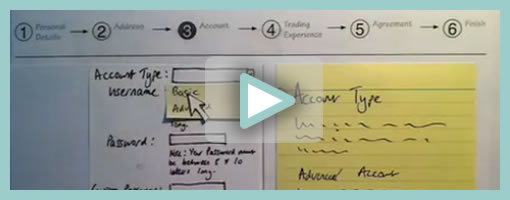
Superb. Very similar to the previous post on Protocasting, here is Chris’ approach to creating quick paper prototype animations which tell stories of rich interaction. This stop-frame animation approach requires a web cam, some video editing software (Quicktime in this case) as well as a desk attached rig to ensure things are visually stable. For showing changing text, Chris uses an erasable pen and overlaid acetate on top of the desk which he calls ‘the stage’. This powerful technique, which portrays interaction seamlessly, is a critical move forward if we are to battle change blindness brought on by shuffling disrupted and disjointed screens. In his own words:

The desk is the stage, and the action is framed inside a print-out of an empty browser to give it context. I wanted it to look so simple and sketchy that nobody could possibly confuse it with a design, so I used paper, card and Post-Its to build up the scene and laid a sheet of acetate on top, which I wrote on with OHP pen. There’s a rather crude cardboard mouse-cursor and a rotating paper ‘in progress’ icon.

There are 8 animations in total, each of which illustrates part of a user journey through the form and highlights complex validation behaviour I’d found tricky to explain. I was a bit worried that the developers might think it was gimmicky, but the novelty wore off quickly and they rapidly moved on to focus on the content. Because the videos illustrated a lot of the main ideas, everyone involved was spared long, tedious meetings talking about display conditions and validation behaviour. This was a big win.

The whole process is really quick and, most importantly, fun – developers and stakeholders engage fully even with dry subject matter. Non-techies can get involved too because the animation software only has about 3 buttons. Unlike with Flex or AJAX, there’s no learning curve.

Animation is famous for taking ages, but doing animations like mine is remarkably quick providing you’re tooled up and organised. It took me about half an hour to set the scene, based on some wireframes we’d already done. Then each animation took about 15 minutes.

Credits: Chris Neale

Paper Prototype Cutouts

Wednesday, November 18th, 2009


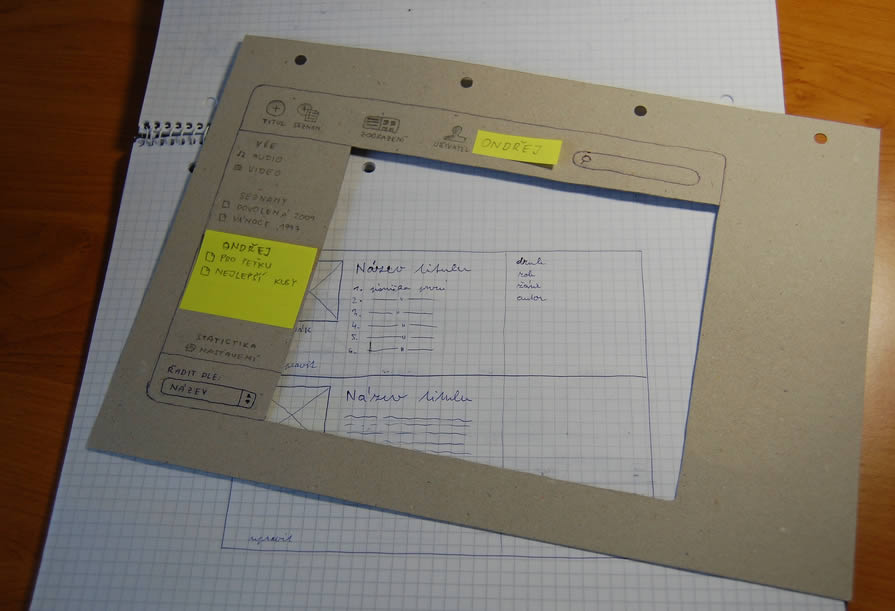
Here is a cool idea of combining multi layered interfaces in the physical world. Ondřej has created a paper cutout for this sketches that allows him to reuse parts of his interface by means of overlapping screens. Real world masters? :) In his own words:

As a part of a school project of mine I created such prototype. Having considered all the problems I’m going to resolve I’ve made a list of proper goals:

  1. I have to create a paper prototype of an audio/video manager app. I already have the creative brief and the technical brief.
  2. The prototype should contain all the screens and dialogue boxes of the app. It should be compact, easy to store, portable all-in-one solution.
  3. It should provide quick and fancy user testing.

I wanted to have the whole app in a single notebook. Because the app would have a single window interface, the solution had crossed my mind immediately.

The result with all its benefits you can see above.

  1. A page = a screen. Using such solution provides you with a lot of space around every screen. Put down some thoughts, notes and explanations.
  2. The main frame of the app can serve as a stencil when drawing new screens. Speeds ups the drawing process and keeps the notebook full of drawings clean and consistent.
  3. In addition, the space around every screen serves as a place for pop-up windows, dialog boxes and other elements made from post-it papers.
  4. The main frame stencil can hide all the stuff around a screen and turns a set of described wireframes into a testable prototype in a moment.

Take such prototype anywhere, create new screens in a bus or train, test with your mates during a coffee break and finally archive it next to your past prototypes. Worth trying, isn’t it?

Credits: Ondřej Válka

Interactive Sketching Notation 0.1

Thursday, October 29th, 2009


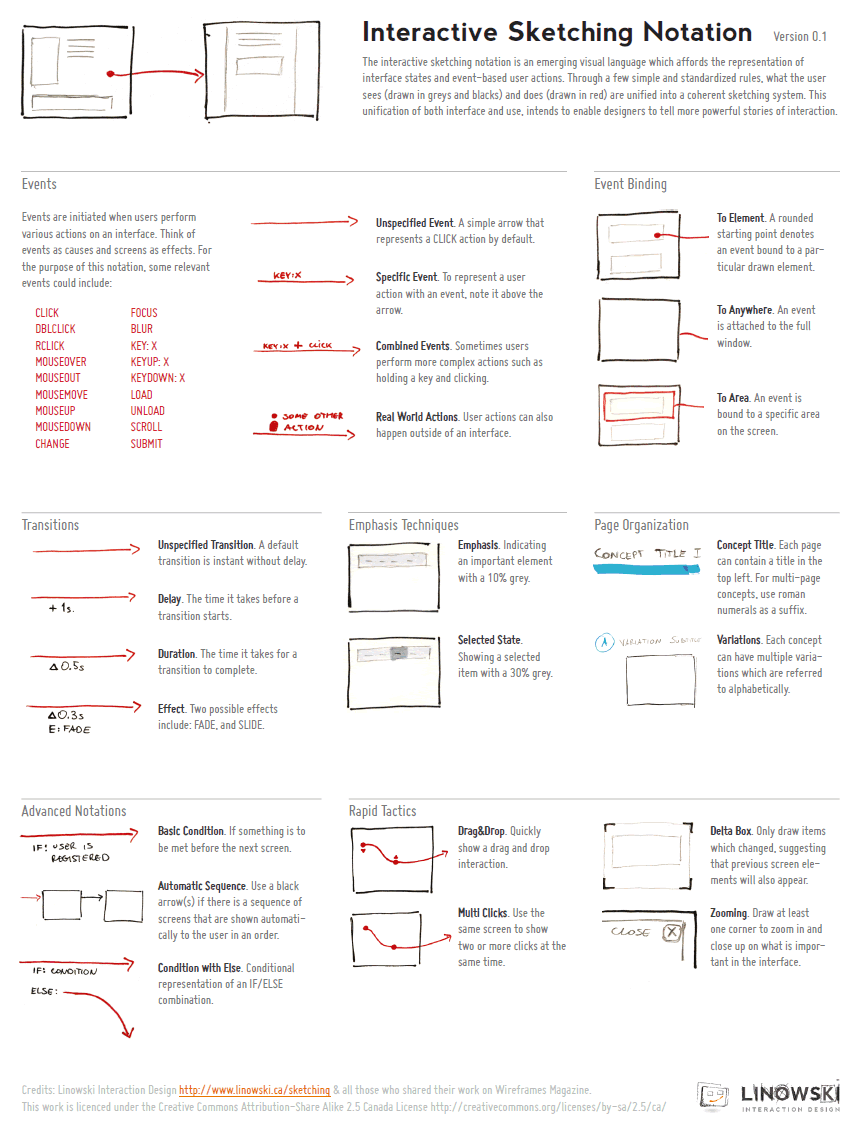
After being inspired by people’s UI sketches for almost a year now, only naturally, my own approach to drawn user interactions with pen and paper began emerging. This personal compilation of the various techniques which I find relevant, is being published as the so called Interactive Sketching Notation. The general idea behind this notation is the desire to visualize user interface states as well as user actions in a clear and rapid manner. This of course, as the version number implies, is an emerging visual language for sketching interactions which I hope to continue to evolve and improve well into the future. Thanks again to all those who made this possible and please let me know if you find it helpful or have any recommendations. If this inspires your own approach to sketching, I would also love to see some samples of how people use this. .

Download the PDF directly.

Credits: Jakub Linowski
Wiremaps

Thursday, October 15th, 2009


Combine wireframes and sitemaps together and you get something like this following sample from Jason. Wiremaps or siteframes? :) In the man’s own words:

First, the colors aren’t so significant. I just ran out of yellow. :) Underneath each sticky is a few other stickies from previous revisions. As time went on, things changed and so did the stickies on this page.

This document started off as ideas scribbled on a whiteboard. We devised an info architecture that involved controlling the user path by allowing them to drill down (vertically on the sheet) and across ( horizontally) but not diagonally. It’s not super clear, but everyone who needs to know understands the user flow through these pages.

There are 12 new pages that need to be created, as well as revising another half dozen or so. These sticky-frames also act as a site map, or at the least, a site map of templates.

Credits: Jason Robb

Visible Change History in Sketches

Tuesday, October 13th, 2009


According to Jason, sketches are never complete but only refined. They exist with the intention to pose questions and ask to be scribbled over on top. And that’s exactly how Jason uses them. He will make adjustments and modification straight over them with a red coloured marker. Thus in a way, all on the same drawing, the sketches become a layered representation of the initial idea along with the revisions. Although I personally prefer to use red to represent action items on my sketches, I still find this interesting approach in its power to visualize a history of changes. This makes me wonder though if there would be a systemic way to separate out all future sketch revisions from each other. Could there also be possibly a way to tag which sketched changes belong to which person (should there be multiple authors?) … ahh, just thinking out loud.

Enough of my thoughts. Here is what Jason really thinks:

I was sketching some designs for wireframe templates. The red is my way of calling attention to changes, questions, or comments about the design.

The neat thing about sketches is that what you see there is black and red. The black is my initial guess. The red is the correction to my initial guess. From there, I implement the changes in the live product. So, for instance, I opened my PSD and made the changes in there.

So the sketches are never really “done.” They’re done in the sense that I’m done using them. But they’re not done in the finished sense, they don’t reflect the final changes, other than by what I’ve written in red.

Credits: Jason Robb

MBTI Sketching Framework

Thursday, October 8th, 2009


Here is another interesting sketching approach which Henk describes in detail in an article on his blog. Basically, the framework he uses aims to support various personality traits based on the Myers-Briggs Type Indicator, as originated from the psychologist, Carl Jung. In this approach, the designer is forced to generate concepts for these distinct personality types which are segmented into four areas. These types include: competitive, spontaneous, humanistic and methodical. I guess it’s interesting to see designers find inspiration from 100 year old ideas.

Credits: Henk Wijnholds

UI Flow Shorthand Notation

Tuesday, September 22nd, 2009


Amongst screens and wireframes, as interaction designers it is always important to consider the time element which binds and glues interface forms with human activity. Ryan Singer of 37signals just wrote an awesome little article about a quick way of noting down one of the common time-based documents we deal with – user interface flows. His shorthand version of a flow relies on making clusters composed of interface states or screens (above a horizontal line) and the actions which users take (below a horizontal line). These interface-action combinations are then transformed into a flow with the help of arrows that show possible sequences.

As basic as the approach sounds, it offers something quite unique in its potential for flexibility. Interestingly, Ryan has figured out a new way of how to represent alternative user actions per each screen (something I haven’t seen done before). These various actions which the users may take, can be separated out using a dotted line. More so, the notation also allows to visualize combined interface results stemming from a single action with the help of forking or branching arrows.

Overall, in an agile fashion, Ryan does not give much weight to these documents. Just like any other light and sketchy work, he hints at these flows being ephemeral and perhaps even a bit self-targeted:

Now don’t forget: all diagrams are destined for the garbage. The meaningful work is work that directly affects our customers as screens they can see or code that functions. But we still need to communicate and manage our work along the way. This shorthand has met a bare minimum for me to get a flow out of my brain in order to move on to other things. I hope it’s useful for you too.

Credits: Ryan Singer

Prioritized Stickynote Requirements

Thursday, September 17th, 2009


Des just sent me a link to where he describes his early design process with a few whiteboard wireframes. One thing he does is create some sort of inpage requirements with the help of sticky notes which are placed alongside the UI work for inspiration. These rough and abstract textual ideas or requirements guide his thinking during the wireframing process. More so, he goes even further and uses colour coded stickies to denote priority.

In his own words:

They’re colored by importance. For this project it was:
Yellow = super important, site is useless without
Pink = nice to have, but requires restaurant owners to do some work
Orange = social features, relies heavily on people using the site (might not be there at all).

At the same time, I also found it very interesting that Des explores variations or alternatives as not to fall into the pattern trap. There is another interesting article related to this which he wrote about, Thinking in Patterns, on his company blog.

Credits: Des Traynor

Long Page Sketches

Thursday, September 10th, 2009


Quite often user interface pages will have to be long and scroll. As obvious as it sounds, here is a sketch which supports this. Jason has simply decreased the size of his frames and made them taller. On the same note, one of his sketches also makes use of a zigzagged line. I would guess that has been done to suggest a continuation of sorts, allowing him to communicate that there is more to the page without having to go into detail. I also like the heavy emphasis used on the title. Nice!

Credits: Jason Robb